> ## Documentation Index
> Fetch the complete documentation index at: https://cometchat-22654f5b-docs-llms-scoped-indexes.mintlify.site/llms.txt
> Use this file to discover all available pages before exploring further.
# Search
> Real-time search interface for finding conversations and messages with filters, scopes, and customization options.
```json theme={null}
{
"component": "CometChatSearch",
"package": "com.cometchat.chatuikit.search",
"xmlElement": "",
"description": "Real-time search interface for finding conversations and messages with filters, scopes, and customization options.",
"primaryOutput": {
"conversationClicked": {
"method": "setOnConversationClicked",
"type": "OnItemClick"
},
"messageClicked": {
"method": "setOnMessageClicked",
"type": "OnItemClick"
}
},
"methods": {
"data": {
"setConversationsRequestBuilder": {
"type": "ConversationsRequest.ConversationsRequestBuilder",
"default": "SDK default",
"note": "Pass the builder, not the result of .build()"
},
"setMessagesRequestBuilder": {
"type": "MessagesRequest.MessagesRequestBuilder",
"default": "SDK default",
"note": "Pass the builder, not the result of .build()"
}
},
"callbacks": {
"setOnConversationClicked": "OnItemClick",
"setOnMessageClicked": "OnItemClick",
"setOnBackPressListener": "OnBackPress",
"setOnError": "OnError",
"setOnEmpty": "OnEmpty",
"setOnLoadMessages": "OnLoad",
"setOnLoadConversations": "OnLoad"
},
"visibility": {
"setEmptyStateVisibility": { "type": "int (View.VISIBLE | View.GONE)", "default": "View.VISIBLE" },
"setErrorStateVisibility": { "type": "int", "default": "View.VISIBLE" }
},
"functionality": {
"setUid": { "type": "String", "note": "Scope search to a specific user conversation" },
"setGuid": { "type": "String", "note": "Scope search to a specific group conversation" },
"setSearchFilters": { "type": "List", "note": "Filters rendered as chips" },
"setInitialSearchFilter": { "type": "UIKitConstants.SearchFilter", "note": "Default active filter on load" },
"setSearchIn": { "type": "List", "note": "Entities to search in" },
"setHideGroupType": { "type": "boolean", "default": "false" },
"setHideUserStatus": { "type": "boolean", "default": "false" }
},
"viewSlots": {
"setConversationItemView": "ConversationsSearchViewHolderListener — entire conversation item row",
"setTextMessageItemView": "MessagesSearchViewHolderListener — text message item",
"setImageMessageItemView": "MessagesSearchViewHolderListener — image message item",
"setAudioMessageItemView": "MessagesSearchViewHolderListener — audio message item",
"setVideoMessageItemView": "MessagesSearchViewHolderListener — video message item",
"setDocumentMessageItemView": "MessagesSearchViewHolderListener — document message item",
"setLinkMessageItemView": "MessagesSearchViewHolderListener — link message item",
"setInitialView": "@LayoutRes int — initial state before search",
"setEmptyView": "@LayoutRes int — empty state",
"setLoadingView": "View — loading state",
"setErrorView": "View — error state"
},
"advanced": {
"setTextFormatters": "List — custom text formatters",
"setDateTimeFormatter": "DateTimeFormatterCallback — custom date/time formatting",
"setMentionAllLabelId": "String id, String mentionAllLabel — custom mention-all label",
"setHintText": "String — search bar hint text"
},
"style": {
"setStyle": {
"type": "@StyleRes int",
"parent": "CometChatSearchStyle"
}
}
},
"events": [],
"sdkListeners": []
}
```
## Where It Fits
`CometChatSearch` is a composite search component. It searches across conversations and messages in real time and emits the selected result via `setOnConversationClicked` or `setOnMessageClicked`. Wire it to navigation so tapping a conversation opens the message view, or tapping a message scrolls to it in context.
```kotlin ChatActivity.kt lines theme={null}
class ChatActivity : AppCompatActivity() {
private lateinit var search: CometChatSearch
private lateinit var messageHeader: CometChatMessageHeader
private lateinit var messageList: CometChatMessageList
private lateinit var messageComposer: CometChatMessageComposer
override fun onCreate(savedInstanceState: Bundle?) {
super.onCreate(savedInstanceState)
setContentView(R.layout.activity_chat)
search = findViewById(R.id.cometchat_search)
messageHeader = findViewById(R.id.message_header)
messageList = findViewById(R.id.message_list)
messageComposer = findViewById(R.id.message_composer)
search.setOnConversationClicked { view, position, conversation ->
val user = conversation.conversationWith as? User
user?.let {
messageHeader.setUser(it)
messageList.setUser(it)
messageComposer.setUser(it)
}
}
search.setOnMessageClicked { view, position, baseMessage ->
// Navigate to the message in context
}
}
}
```
```java ChatActivity.java lines theme={null}
public class ChatActivity extends AppCompatActivity {
private CometChatSearch search;
private CometChatMessageHeader messageHeader;
private CometChatMessageList messageList;
private CometChatMessageComposer messageComposer;
@Override
protected void onCreate(Bundle savedInstanceState) {
super.onCreate(savedInstanceState);
setContentView(R.layout.activity_chat);
search = findViewById(R.id.cometchat_search);
messageHeader = findViewById(R.id.message_header);
messageList = findViewById(R.id.message_list);
messageComposer = findViewById(R.id.message_composer);
search.setOnConversationClicked((view, position, conversation) -> {
if (conversation.getConversationWith() instanceof User) {
User user = (User) conversation.getConversationWith();
messageHeader.setUser(user);
messageList.setUser(user);
messageComposer.setUser(user);
}
});
search.setOnMessageClicked((view, position, baseMessage) -> {
// Navigate to the message in context
});
}
}
```
## Quick Start
Add the component to your layout XML:
```xml activity_search.xml lines theme={null}
```
 Prerequisites: CometChat SDK initialized with `CometChatUIKit.init()`, a user logged in, and the `cometchat-chat-uikit-android` dependency added.
To add programmatically in an Activity:
```kotlin SearchActivity.kt lines theme={null}
class SearchActivity : AppCompatActivity() {
private lateinit var binding: ActivitySearchBinding
override fun onCreate(savedInstanceState: Bundle?) {
super.onCreate(savedInstanceState)
binding = ActivitySearchBinding.inflate(layoutInflater)
setContentView(binding.root)
}
}
```
```java SearchActivity.java lines theme={null}
public class SearchActivity extends AppCompatActivity {
private ActivitySearchBinding binding;
@Override
protected void onCreate(Bundle savedInstanceState) {
super.onCreate(savedInstanceState);
binding = ActivitySearchBinding.inflate(getLayoutInflater());
setContentView(binding.getRoot());
}
}
```
## Actions and Events
### Callback Methods
#### `setOnConversationClicked`
Fires when a user taps a conversation from the search results. Primary navigation hook — set the active conversation and render the message view.
```kotlin SearchActivity.kt lines theme={null}
binding.cometchatSearch.setOnConversationClicked { view, position, conversation ->
Log.i(TAG, "onCreate: Conversation Clicked !")
}
```
```java SearchActivity.java lines theme={null}
binding.cometchatSearch.setOnConversationClicked((view, position, conversation) -> {
Log.d(TAG, "onCreate: Conversation Clicked !");
});
```
> **What this does:** Replaces the default conversation-click behavior. When a user taps a conversation item, your custom lambda executes. The callback receives the view, position, and `Conversation` object.
#### `setOnMessageClicked`
Fires when a user taps a message from the search results. Use to navigate to the message in context.
```kotlin SearchActivity.kt lines theme={null}
binding.cometchatSearch.setOnMessageClicked { view, position, baseMessage ->
Log.i(TAG, "onCreate: Message Clicked !")
}
```
```java SearchActivity.java lines theme={null}
binding.cometchatSearch.setOnMessageClicked((view, position, baseMessage) -> {
Log.d(TAG, "onCreate: Message Clicked !");
});
```
> **What this does:** Registers a callback that fires when the user taps a message in the search results. The callback receives the view, position, and `BaseMessage` object.
#### `setOnBackPressListener`
Fires when the user presses the back button in the search bar. Default: no predefined behavior.
```kotlin SearchActivity.kt lines theme={null}
binding.cometchatSearch.setOnBackPressListener {
Log.i(TAG, "onCreate: Back Pressed !")
}
```
```java SearchActivity.java lines theme={null}
binding.cometchatSearch.setOnBackPressListener(() -> {
Log.d(TAG, "onCreate: Back Pressed !");
});
```
#### `setOnError`
Fires on internal errors (network failure, auth issue, SDK exception).
```kotlin SearchActivity.kt lines theme={null}
binding.cometchatSearch.onError = OnError {
Log.i(TAG, "onCreate: Error Occurred ! ${it.message}")
}
```
```java SearchActivity.java lines theme={null}
binding.cometchatSearch.setOnError((e -> {
Log.e(TAG, "onCreate: ", e);
}));
```
#### `setOnLoadMessages`
Fires when the message list is successfully fetched and loaded, helping track when message search results are ready.
```kotlin SearchActivity.kt lines theme={null}
binding.cometchatSearch.setOnLoadMessages(OnLoad { list ->
Log.i(TAG, "Messages loaded: ${list.size}")
})
```
```java SearchActivity.java lines theme={null}
binding.cometchatSearch.setOnLoadMessages(list -> {
Log.d(TAG, "Messages loaded: " + list.size());
});
```
#### `setOnLoadConversations`
Fires when the conversation list is successfully fetched and loaded, helping track when conversation search results are ready.
```kotlin SearchActivity.kt lines theme={null}
binding.cometchatSearch.setOnLoadConversations(OnLoad { list ->
Log.i(TAG, "Conversations loaded: ${list.size}")
})
```
```java SearchActivity.java lines theme={null}
binding.cometchatSearch.setOnLoadConversations(list -> {
Log.d(TAG, "Conversations loaded: " + list.size());
});
```
#### `setOnEmpty`
Fires when the search returns no results, enabling custom handling such as showing a placeholder.
```kotlin SearchActivity.kt lines theme={null}
binding.cometchatSearch.onEmpty = OnEmpty {
Log.i(TAG, "onCreate: No Results Found !")
}
```
```java SearchActivity.java lines theme={null}
binding.cometchatSearch.setOnEmpty(() -> {
Log.d(TAG, "onCreate: Empty Result !");
});
```
* **Verify**: After setting an action callback, trigger the corresponding user interaction (tap a conversation result, tap a message result, press back, cause an error, or search for a term with no results) and confirm your custom logic executes.
### Global UI Events
The `CometChatSearch` component does not produce any global UI events.
### SDK Events (Real-Time, Automatic)
The `CometChatSearch` component does not listen to any SDK events internally. Search results are fetched on demand when the user types a query.
## Functionality
Small functional customizations such as toggling visibility of UI elements and configuring search scope.
| Methods | Description | Code |
| - | - | - |
| `setEmptyStateVisibility` | Hides the empty state when search returns no results | `.setEmptyStateVisibility(View.GONE);` |
| `setErrorStateVisibility` | Hides the error state on search failure | `.setErrorStateVisibility(View.GONE);` |
| `setSearchFilters` | List of filters rendered as chips in the search component | `.setSearchFilters(filters);` |
| `setInitialSearchFilter` | The filter which will be active by default on load | `.setInitialSearchFilter(UIKitConstants.SearchFilter.MESSAGES);` |
| `setSearchIn` | List of entities in which the search should be performed | `.setSearchIn(scopes);` |
| `setHideGroupType` | Hides the group type icon in conversation leading view | `.setHideGroupType(true);` |
| `setHideUserStatus` | Hides the user's online/offline status indicator | `.setHideUserStatus(true);` |
* **Verify**: After calling a visibility or functionality method, confirm the corresponding UI element is shown or hidden, or the search scope is correctly applied.
## Custom View Slots
Each slot replaces a section of the default UI. Conversation item slots use the `ConversationsSearchViewHolderListener` pattern (`createView` + `bindView`). Message item slots use the `MessagesSearchViewHolderListener` pattern.
| Slot | Method | Replaces |
| - | - | - |
| Conversation item view | `setConversationItemView(ConversationsSearchViewHolderListener)` | Entire conversation item row |
| Text message item | `setTextMessageItemView(MessagesSearchViewHolderListener)` | Text message item |
| Image message item | `setImageMessageItemView(MessagesSearchViewHolderListener)` | Image message item |
| Audio message item | `setAudioMessageItemView(MessagesSearchViewHolderListener)` | Audio message item |
| Video message item | `setVideoMessageItemView(MessagesSearchViewHolderListener)` | Video message item |
| Document message item | `setDocumentMessageItemView(MessagesSearchViewHolderListener)` | Document message item |
| Link message item | `setLinkMessageItemView(MessagesSearchViewHolderListener)` | Link message item |
| Initial view | `setInitialView(@LayoutRes int)` | Initial state before search |
| Empty view | `setEmptyView(@LayoutRes int)` | Empty state |
| Loading view | `setLoadingView(View)` | Loading spinner |
| Error view | `setErrorView(View)` | Error state |
### `setConversationItemView`
Replace the entire conversation item row in search results.
```kotlin SearchActivity.kt lines theme={null}
binding.cometchatSearch.setConversationItemView(object : ConversationsSearchViewHolderListener() {
override fun createView(context: Context?, listItem: View?): View? {
return layoutInflater.inflate(R.layout.custom_conversation_search_item, null)
}
override fun bindView(
context: Context?,
createdView: View?,
conversation: Conversation?,
holder: RecyclerView.ViewHolder?,
conversationList: List?,
position: Int
) {
val titleTv = createdView?.findViewById(R.id.tv_title)
conversation?.let {
if (it.conversationType == CometChatConstants.CONVERSATION_TYPE_USER) {
titleTv?.text = (it.conversationWith as User).name
} else {
titleTv?.text = (it.conversationWith as Group).name
}
}
}
})
```
```java SearchActivity.java lines theme={null}
binding.cometchatSearch.setConversationItemView(new ConversationsSearchViewHolderListener() {
@Override
public View createView(Context context, View listItem) {
LayoutInflater layoutInflater = (LayoutInflater) context.getSystemService(Context.LAYOUT_INFLATER_SERVICE);
return layoutInflater.inflate(R.layout.custom_conversation_search_item, null);
}
@Override
public void bindView(Context context, View createdView, Conversation conversation, RecyclerView.ViewHolder holder, List conversationList, int position) {
android.widget.TextView titleTv = createdView.findViewById(R.id.tv_title);
if (conversation != null) {
if (conversation.getConversationType().equals(CometChatConstants.CONVERSATION_TYPE_USER)) {
titleTv.setText(((User) conversation.getConversationWith()).getName());
} else {
titleTv.setText(((Group) conversation.getConversationWith()).getName());
}
}
}
});
```
> **What this does:** Registers a `ConversationsSearchViewHolderListener` for conversation items in search results. The `createView` method inflates a custom layout, and `bindView` populates it with the conversation name based on whether it's a user or group conversation.
### `setTextMessageItemView`
Replace the text message item view in search results.
Define a custom layout XML:
```xml custom_message_item_view.xml lines theme={null}
```
```kotlin SearchActivity.kt lines theme={null}
binding.cometchatSearch.setTextMessageItemView(object : MessagesSearchViewHolderListener() {
override fun createView(
context: Context?,
listItem: View?
): View? {
return layoutInflater.inflate(R.layout.custom_message_item_view, null)
}
override fun bindView(
context: Context?,
createdView: View?,
message: TextMessage?,
holder: RecyclerView.ViewHolder?,
messagesList: List?,
position: Int
) {
val titleTv = createdView?.findViewById(R.id.tv_sender_name)
val messageTv = createdView?.findViewById(R.id.tv_message)
titleTv?.text = message?.sender?.name
messageTv?.text = message?.text
}
})
```
```java SearchActivity.java lines theme={null}
binding.cometchatSearch.setTextMessageItemView(new MessagesSearchViewHolderListener() {
@Override
public View createView(Context context, View listItem) {
LayoutInflater layoutInflater = (LayoutInflater) context.getSystemService(Context.LAYOUT_INFLATER_SERVICE);
return layoutInflater.inflate(R.layout.custom_message_item_view, null);
}
@Override
public void bindView(Context context, View createdView, TextMessage message, RecyclerView.ViewHolder holder, List messagesList, int position) {
android.widget.TextView titleTv = createdView.findViewById(R.id.tv_sender_name);
android.widget.TextView messageTv = createdView.findViewById(R.id.tv_message);
if (message != null) {
titleTv.setText(message.getSender().getName());
messageTv.setText(message.getText());
}
}
});
```
> **What this does:** Registers a `MessagesSearchViewHolderListener` for text messages. The `createView` method inflates the custom layout, and `bindView` populates the sender name and message text from the `TextMessage` object.
Prerequisites: CometChat SDK initialized with `CometChatUIKit.init()`, a user logged in, and the `cometchat-chat-uikit-android` dependency added.
To add programmatically in an Activity:
```kotlin SearchActivity.kt lines theme={null}
class SearchActivity : AppCompatActivity() {
private lateinit var binding: ActivitySearchBinding
override fun onCreate(savedInstanceState: Bundle?) {
super.onCreate(savedInstanceState)
binding = ActivitySearchBinding.inflate(layoutInflater)
setContentView(binding.root)
}
}
```
```java SearchActivity.java lines theme={null}
public class SearchActivity extends AppCompatActivity {
private ActivitySearchBinding binding;
@Override
protected void onCreate(Bundle savedInstanceState) {
super.onCreate(savedInstanceState);
binding = ActivitySearchBinding.inflate(getLayoutInflater());
setContentView(binding.getRoot());
}
}
```
## Actions and Events
### Callback Methods
#### `setOnConversationClicked`
Fires when a user taps a conversation from the search results. Primary navigation hook — set the active conversation and render the message view.
```kotlin SearchActivity.kt lines theme={null}
binding.cometchatSearch.setOnConversationClicked { view, position, conversation ->
Log.i(TAG, "onCreate: Conversation Clicked !")
}
```
```java SearchActivity.java lines theme={null}
binding.cometchatSearch.setOnConversationClicked((view, position, conversation) -> {
Log.d(TAG, "onCreate: Conversation Clicked !");
});
```
> **What this does:** Replaces the default conversation-click behavior. When a user taps a conversation item, your custom lambda executes. The callback receives the view, position, and `Conversation` object.
#### `setOnMessageClicked`
Fires when a user taps a message from the search results. Use to navigate to the message in context.
```kotlin SearchActivity.kt lines theme={null}
binding.cometchatSearch.setOnMessageClicked { view, position, baseMessage ->
Log.i(TAG, "onCreate: Message Clicked !")
}
```
```java SearchActivity.java lines theme={null}
binding.cometchatSearch.setOnMessageClicked((view, position, baseMessage) -> {
Log.d(TAG, "onCreate: Message Clicked !");
});
```
> **What this does:** Registers a callback that fires when the user taps a message in the search results. The callback receives the view, position, and `BaseMessage` object.
#### `setOnBackPressListener`
Fires when the user presses the back button in the search bar. Default: no predefined behavior.
```kotlin SearchActivity.kt lines theme={null}
binding.cometchatSearch.setOnBackPressListener {
Log.i(TAG, "onCreate: Back Pressed !")
}
```
```java SearchActivity.java lines theme={null}
binding.cometchatSearch.setOnBackPressListener(() -> {
Log.d(TAG, "onCreate: Back Pressed !");
});
```
#### `setOnError`
Fires on internal errors (network failure, auth issue, SDK exception).
```kotlin SearchActivity.kt lines theme={null}
binding.cometchatSearch.onError = OnError {
Log.i(TAG, "onCreate: Error Occurred ! ${it.message}")
}
```
```java SearchActivity.java lines theme={null}
binding.cometchatSearch.setOnError((e -> {
Log.e(TAG, "onCreate: ", e);
}));
```
#### `setOnLoadMessages`
Fires when the message list is successfully fetched and loaded, helping track when message search results are ready.
```kotlin SearchActivity.kt lines theme={null}
binding.cometchatSearch.setOnLoadMessages(OnLoad { list ->
Log.i(TAG, "Messages loaded: ${list.size}")
})
```
```java SearchActivity.java lines theme={null}
binding.cometchatSearch.setOnLoadMessages(list -> {
Log.d(TAG, "Messages loaded: " + list.size());
});
```
#### `setOnLoadConversations`
Fires when the conversation list is successfully fetched and loaded, helping track when conversation search results are ready.
```kotlin SearchActivity.kt lines theme={null}
binding.cometchatSearch.setOnLoadConversations(OnLoad { list ->
Log.i(TAG, "Conversations loaded: ${list.size}")
})
```
```java SearchActivity.java lines theme={null}
binding.cometchatSearch.setOnLoadConversations(list -> {
Log.d(TAG, "Conversations loaded: " + list.size());
});
```
#### `setOnEmpty`
Fires when the search returns no results, enabling custom handling such as showing a placeholder.
```kotlin SearchActivity.kt lines theme={null}
binding.cometchatSearch.onEmpty = OnEmpty {
Log.i(TAG, "onCreate: No Results Found !")
}
```
```java SearchActivity.java lines theme={null}
binding.cometchatSearch.setOnEmpty(() -> {
Log.d(TAG, "onCreate: Empty Result !");
});
```
* **Verify**: After setting an action callback, trigger the corresponding user interaction (tap a conversation result, tap a message result, press back, cause an error, or search for a term with no results) and confirm your custom logic executes.
### Global UI Events
The `CometChatSearch` component does not produce any global UI events.
### SDK Events (Real-Time, Automatic)
The `CometChatSearch` component does not listen to any SDK events internally. Search results are fetched on demand when the user types a query.
## Functionality
Small functional customizations such as toggling visibility of UI elements and configuring search scope.
| Methods | Description | Code |
| - | - | - |
| `setEmptyStateVisibility` | Hides the empty state when search returns no results | `.setEmptyStateVisibility(View.GONE);` |
| `setErrorStateVisibility` | Hides the error state on search failure | `.setErrorStateVisibility(View.GONE);` |
| `setSearchFilters` | List of filters rendered as chips in the search component | `.setSearchFilters(filters);` |
| `setInitialSearchFilter` | The filter which will be active by default on load | `.setInitialSearchFilter(UIKitConstants.SearchFilter.MESSAGES);` |
| `setSearchIn` | List of entities in which the search should be performed | `.setSearchIn(scopes);` |
| `setHideGroupType` | Hides the group type icon in conversation leading view | `.setHideGroupType(true);` |
| `setHideUserStatus` | Hides the user's online/offline status indicator | `.setHideUserStatus(true);` |
* **Verify**: After calling a visibility or functionality method, confirm the corresponding UI element is shown or hidden, or the search scope is correctly applied.
## Custom View Slots
Each slot replaces a section of the default UI. Conversation item slots use the `ConversationsSearchViewHolderListener` pattern (`createView` + `bindView`). Message item slots use the `MessagesSearchViewHolderListener` pattern.
| Slot | Method | Replaces |
| - | - | - |
| Conversation item view | `setConversationItemView(ConversationsSearchViewHolderListener)` | Entire conversation item row |
| Text message item | `setTextMessageItemView(MessagesSearchViewHolderListener)` | Text message item |
| Image message item | `setImageMessageItemView(MessagesSearchViewHolderListener)` | Image message item |
| Audio message item | `setAudioMessageItemView(MessagesSearchViewHolderListener)` | Audio message item |
| Video message item | `setVideoMessageItemView(MessagesSearchViewHolderListener)` | Video message item |
| Document message item | `setDocumentMessageItemView(MessagesSearchViewHolderListener)` | Document message item |
| Link message item | `setLinkMessageItemView(MessagesSearchViewHolderListener)` | Link message item |
| Initial view | `setInitialView(@LayoutRes int)` | Initial state before search |
| Empty view | `setEmptyView(@LayoutRes int)` | Empty state |
| Loading view | `setLoadingView(View)` | Loading spinner |
| Error view | `setErrorView(View)` | Error state |
### `setConversationItemView`
Replace the entire conversation item row in search results.
```kotlin SearchActivity.kt lines theme={null}
binding.cometchatSearch.setConversationItemView(object : ConversationsSearchViewHolderListener() {
override fun createView(context: Context?, listItem: View?): View? {
return layoutInflater.inflate(R.layout.custom_conversation_search_item, null)
}
override fun bindView(
context: Context?,
createdView: View?,
conversation: Conversation?,
holder: RecyclerView.ViewHolder?,
conversationList: List?,
position: Int
) {
val titleTv = createdView?.findViewById(R.id.tv_title)
conversation?.let {
if (it.conversationType == CometChatConstants.CONVERSATION_TYPE_USER) {
titleTv?.text = (it.conversationWith as User).name
} else {
titleTv?.text = (it.conversationWith as Group).name
}
}
}
})
```
```java SearchActivity.java lines theme={null}
binding.cometchatSearch.setConversationItemView(new ConversationsSearchViewHolderListener() {
@Override
public View createView(Context context, View listItem) {
LayoutInflater layoutInflater = (LayoutInflater) context.getSystemService(Context.LAYOUT_INFLATER_SERVICE);
return layoutInflater.inflate(R.layout.custom_conversation_search_item, null);
}
@Override
public void bindView(Context context, View createdView, Conversation conversation, RecyclerView.ViewHolder holder, List conversationList, int position) {
android.widget.TextView titleTv = createdView.findViewById(R.id.tv_title);
if (conversation != null) {
if (conversation.getConversationType().equals(CometChatConstants.CONVERSATION_TYPE_USER)) {
titleTv.setText(((User) conversation.getConversationWith()).getName());
} else {
titleTv.setText(((Group) conversation.getConversationWith()).getName());
}
}
}
});
```
> **What this does:** Registers a `ConversationsSearchViewHolderListener` for conversation items in search results. The `createView` method inflates a custom layout, and `bindView` populates it with the conversation name based on whether it's a user or group conversation.
### `setTextMessageItemView`
Replace the text message item view in search results.
Define a custom layout XML:
```xml custom_message_item_view.xml lines theme={null}
```
```kotlin SearchActivity.kt lines theme={null}
binding.cometchatSearch.setTextMessageItemView(object : MessagesSearchViewHolderListener() {
override fun createView(
context: Context?,
listItem: View?
): View? {
return layoutInflater.inflate(R.layout.custom_message_item_view, null)
}
override fun bindView(
context: Context?,
createdView: View?,
message: TextMessage?,
holder: RecyclerView.ViewHolder?,
messagesList: List?,
position: Int
) {
val titleTv = createdView?.findViewById(R.id.tv_sender_name)
val messageTv = createdView?.findViewById(R.id.tv_message)
titleTv?.text = message?.sender?.name
messageTv?.text = message?.text
}
})
```
```java SearchActivity.java lines theme={null}
binding.cometchatSearch.setTextMessageItemView(new MessagesSearchViewHolderListener() {
@Override
public View createView(Context context, View listItem) {
LayoutInflater layoutInflater = (LayoutInflater) context.getSystemService(Context.LAYOUT_INFLATER_SERVICE);
return layoutInflater.inflate(R.layout.custom_message_item_view, null);
}
@Override
public void bindView(Context context, View createdView, TextMessage message, RecyclerView.ViewHolder holder, List messagesList, int position) {
android.widget.TextView titleTv = createdView.findViewById(R.id.tv_sender_name);
android.widget.TextView messageTv = createdView.findViewById(R.id.tv_message);
if (message != null) {
titleTv.setText(message.getSender().getName());
messageTv.setText(message.getText());
}
}
});
```
> **What this does:** Registers a `MessagesSearchViewHolderListener` for text messages. The `createView` method inflates the custom layout, and `bindView` populates the sender name and message text from the `TextMessage` object.
 ### Other Message Item Views
The following message item view methods follow the same `MessagesSearchViewHolderListener` pattern as `setTextMessageItemView`:
| Method | Message Type | Generic Type |
| - | - | - |
| `setImageMessageItemView` | Image Message | `MessagesSearchViewHolderListener` |
| `setVideoMessageItemView` | Video Message | `MessagesSearchViewHolderListener` |
| `setAudioMessageItemView` | Audio Message | `MessagesSearchViewHolderListener` |
| `setDocumentMessageItemView` | Document Message | `MessagesSearchViewHolderListener` |
| `setLinkMessageItemView` | Link Message | `MessagesSearchViewHolderListener` |
### `setInitialView`
Sets a custom view displayed when the search component is rendered and no search has been performed.
```kotlin lines theme={null}
binding.cometchatSearch.setInitialView(R.layout.your_initial_view)
```
```java lines theme={null}
binding.cometchatSearch.setInitialView(R.layout.your_initial_view);
```
### `setEmptyView`
Configures a custom view displayed when the search returns no results.
```kotlin lines theme={null}
binding.cometchatSearch.setEmptyView(R.layout.your_empty_view)
```
```java lines theme={null}
binding.cometchatSearch.setEmptyView(R.layout.your_empty_view);
```
### `setLoadingView`
Sets a custom loading view displayed when search results are being fetched.
```kotlin lines theme={null}
binding.cometchatSearch.setLoadingView(loadingView)
```
```java lines theme={null}
binding.cometchatSearch.setLoadingView(loadingView);
```
### `setErrorView`
Defines a custom error state view that appears when an issue occurs while searching.
```kotlin lines theme={null}
binding.cometchatSearch.setErrorView(errorView)
```
```java lines theme={null}
binding.cometchatSearch.setErrorView(errorView);
```
* **Verify**: After setting any custom view slot, confirm the custom view renders in the correct position within the search result items, and the data binding populates correctly for each result.
## Common Patterns
### Messages-only search
```kotlin lines theme={null}
binding.cometchatSearch.setSearchFilters(
listOf(UIKitConstants.SearchFilter.MESSAGES)
)
binding.cometchatSearch.setInitialSearchFilter(UIKitConstants.SearchFilter.MESSAGES)
```
```java lines theme={null}
binding.cometchatSearch.setSearchFilters(
Arrays.asList(UIKitConstants.SearchFilter.MESSAGES)
);
binding.cometchatSearch.setInitialSearchFilter(UIKitConstants.SearchFilter.MESSAGES);
```
### Filter by message type
```kotlin lines theme={null}
binding.cometchatSearch.setMessagesRequestBuilder(
MessagesRequest.MessagesRequestBuilder().setLimit(10)
)
```
```java lines theme={null}
binding.cometchatSearch.setMessagesRequestBuilder(
new MessagesRequest.MessagesRequestBuilder().setLimit(10)
);
```
### Scope search to a specific user
```kotlin lines theme={null}
binding.cometchatSearch.setUid("user123")
```
```java lines theme={null}
binding.cometchatSearch.setUid("user123");
```
### Scope search to a specific group
```kotlin lines theme={null}
binding.cometchatSearch.setGuid("group123")
```
```java lines theme={null}
binding.cometchatSearch.setGuid("group123");
```
## Advanced Methods
### Search Scope
#### `setUid`
Scopes the search to a specific user's conversation.
```kotlin lines theme={null}
binding.cometchatSearch.setUid("user123")
```
```java lines theme={null}
binding.cometchatSearch.setUid("user123");
```
#### `setGuid`
Scopes the search to a specific group's conversation.
```kotlin lines theme={null}
binding.cometchatSearch.setGuid("group123")
```
```java lines theme={null}
binding.cometchatSearch.setGuid("group123");
```
### Request Builders
#### `setConversationsRequestBuilder`
Sets a `ConversationsRequest.ConversationsRequestBuilder` to filter conversation search results. Pass the builder instance — not the result of `.build()`. For all available builder options, refer to the [ConversationRequestBuilder](/sdk/android/retrieve-conversations) documentation.
```kotlin lines theme={null}
binding.cometchatSearch.setConversationsRequestBuilder(
ConversationsRequest.ConversationsRequestBuilder().setLimit(10)
)
```
```java lines theme={null}
binding.cometchatSearch.setConversationsRequestBuilder(
new ConversationsRequest.ConversationsRequestBuilder().setLimit(10)
);
```
#### `setMessagesRequestBuilder`
Sets a `MessagesRequest.MessagesRequestBuilder` to filter message search results. For all available builder options, refer to the [MessagesRequestBuilder](/sdk/android/additional-message-filtering) documentation.
```kotlin lines theme={null}
binding.cometchatSearch.setMessagesRequestBuilder(
MessagesRequest.MessagesRequestBuilder().setLimit(5)
)
```
```java lines theme={null}
binding.cometchatSearch.setMessagesRequestBuilder(
new MessagesRequest.MessagesRequestBuilder().setLimit(5)
);
```
### Text Formatters
#### `setTextFormatters`
Enables developers to define and apply text formatters that dynamically modify or transform message content before rendering it in the UI. Text formatters can be used for:
* Automatically converting URLs into clickable links
* Applying Markdown or rich text styling
* Replacing certain words or patterns with emojis or predefined text
* Censoring specific words for moderation
For implementation details, refer to the [MentionsFormatter Guide](/ui-kit/android/v5/mentions-formatter-guide).
### Date/Time Formatting
#### `setDateTimeFormatter`
Provides a custom implementation of `DateTimeFormatterCallback` to configure how time and date values are displayed in search results.
```kotlin lines theme={null}
import java.text.SimpleDateFormat
import java.util.*
binding.cometchatSearch.setDateTimeFormatter(object : DateTimeFormatterCallback {
private val fullTimeFormatter = SimpleDateFormat("hh:mm a", Locale.getDefault())
private val dateFormatter = SimpleDateFormat("dd MMM yyyy", Locale.getDefault())
override fun time(timestamp: Long): String {
return fullTimeFormatter.format(Date(timestamp))
}
override fun today(timestamp: Long): String {
return "Today"
}
override fun yesterday(timestamp: Long): String {
return "Yesterday"
}
override fun lastWeek(timestamp: Long): String {
return "Last Week"
}
override fun otherDays(timestamp: Long): String {
return dateFormatter.format(Date(timestamp))
}
override fun minutes(diffInMinutesFromNow: Long, timestamp: Long): String {
return "$diffInMinutesFromNow mins ago"
}
override fun hours(diffInHourFromNow: Long, timestamp: Long): String {
return "$diffInHourFromNow hrs ago"
}
})
```
```java lines theme={null}
import java.text.SimpleDateFormat;
import java.util.Date;
import java.util.Locale;
binding.cometchatSearch.setDateTimeFormatter(new DateTimeFormatterCallback() {
private final SimpleDateFormat fullTimeFormatter = new SimpleDateFormat("hh:mm a", Locale.getDefault());
private final SimpleDateFormat dateFormatter = new SimpleDateFormat("dd MMM yyyy", Locale.getDefault());
@Override
public String time(long timestamp) {
return fullTimeFormatter.format(new Date(timestamp));
}
@Override
public String today(long timestamp) {
return "Today";
}
@Override
public String yesterday(long timestamp) {
return "Yesterday";
}
@Override
public String lastWeek(long timestamp) {
return "Last Week";
}
@Override
public String otherDays(long timestamp) {
return dateFormatter.format(new Date(timestamp));
}
@Override
public String minutes(long diffInMinutesFromNow, long timestamp) {
return diffInMinutesFromNow + " mins ago";
}
@Override
public String hours(long diffInHourFromNow, long timestamp) {
return diffInHourFromNow + " hrs ago";
}
});
```
> **What this does:** Provides a custom date/time formatter that displays "Today", "Yesterday", "Last Week" for recent messages, a "dd MMM yyyy" format for older messages, and relative time strings like "5 mins ago" or "2 hrs ago" for recent activity.
### Other Advanced Methods
| Method | Type | Description |
| - | - | - |
| `setMentionAllLabelId` | `String id, String mentionAllLabel` | Sets a custom label for the "mention all" feature for a specific ID |
| `setHintText` | `String` | Sets the hint text displayed in the search bar |
## Style
The component uses XML theme styles. Define a custom style with parent `CometChatSearchStyle` in `themes.xml`, then apply with `setStyle()`.
### Other Message Item Views
The following message item view methods follow the same `MessagesSearchViewHolderListener` pattern as `setTextMessageItemView`:
| Method | Message Type | Generic Type |
| - | - | - |
| `setImageMessageItemView` | Image Message | `MessagesSearchViewHolderListener` |
| `setVideoMessageItemView` | Video Message | `MessagesSearchViewHolderListener` |
| `setAudioMessageItemView` | Audio Message | `MessagesSearchViewHolderListener` |
| `setDocumentMessageItemView` | Document Message | `MessagesSearchViewHolderListener` |
| `setLinkMessageItemView` | Link Message | `MessagesSearchViewHolderListener` |
### `setInitialView`
Sets a custom view displayed when the search component is rendered and no search has been performed.
```kotlin lines theme={null}
binding.cometchatSearch.setInitialView(R.layout.your_initial_view)
```
```java lines theme={null}
binding.cometchatSearch.setInitialView(R.layout.your_initial_view);
```
### `setEmptyView`
Configures a custom view displayed when the search returns no results.
```kotlin lines theme={null}
binding.cometchatSearch.setEmptyView(R.layout.your_empty_view)
```
```java lines theme={null}
binding.cometchatSearch.setEmptyView(R.layout.your_empty_view);
```
### `setLoadingView`
Sets a custom loading view displayed when search results are being fetched.
```kotlin lines theme={null}
binding.cometchatSearch.setLoadingView(loadingView)
```
```java lines theme={null}
binding.cometchatSearch.setLoadingView(loadingView);
```
### `setErrorView`
Defines a custom error state view that appears when an issue occurs while searching.
```kotlin lines theme={null}
binding.cometchatSearch.setErrorView(errorView)
```
```java lines theme={null}
binding.cometchatSearch.setErrorView(errorView);
```
* **Verify**: After setting any custom view slot, confirm the custom view renders in the correct position within the search result items, and the data binding populates correctly for each result.
## Common Patterns
### Messages-only search
```kotlin lines theme={null}
binding.cometchatSearch.setSearchFilters(
listOf(UIKitConstants.SearchFilter.MESSAGES)
)
binding.cometchatSearch.setInitialSearchFilter(UIKitConstants.SearchFilter.MESSAGES)
```
```java lines theme={null}
binding.cometchatSearch.setSearchFilters(
Arrays.asList(UIKitConstants.SearchFilter.MESSAGES)
);
binding.cometchatSearch.setInitialSearchFilter(UIKitConstants.SearchFilter.MESSAGES);
```
### Filter by message type
```kotlin lines theme={null}
binding.cometchatSearch.setMessagesRequestBuilder(
MessagesRequest.MessagesRequestBuilder().setLimit(10)
)
```
```java lines theme={null}
binding.cometchatSearch.setMessagesRequestBuilder(
new MessagesRequest.MessagesRequestBuilder().setLimit(10)
);
```
### Scope search to a specific user
```kotlin lines theme={null}
binding.cometchatSearch.setUid("user123")
```
```java lines theme={null}
binding.cometchatSearch.setUid("user123");
```
### Scope search to a specific group
```kotlin lines theme={null}
binding.cometchatSearch.setGuid("group123")
```
```java lines theme={null}
binding.cometchatSearch.setGuid("group123");
```
## Advanced Methods
### Search Scope
#### `setUid`
Scopes the search to a specific user's conversation.
```kotlin lines theme={null}
binding.cometchatSearch.setUid("user123")
```
```java lines theme={null}
binding.cometchatSearch.setUid("user123");
```
#### `setGuid`
Scopes the search to a specific group's conversation.
```kotlin lines theme={null}
binding.cometchatSearch.setGuid("group123")
```
```java lines theme={null}
binding.cometchatSearch.setGuid("group123");
```
### Request Builders
#### `setConversationsRequestBuilder`
Sets a `ConversationsRequest.ConversationsRequestBuilder` to filter conversation search results. Pass the builder instance — not the result of `.build()`. For all available builder options, refer to the [ConversationRequestBuilder](/sdk/android/retrieve-conversations) documentation.
```kotlin lines theme={null}
binding.cometchatSearch.setConversationsRequestBuilder(
ConversationsRequest.ConversationsRequestBuilder().setLimit(10)
)
```
```java lines theme={null}
binding.cometchatSearch.setConversationsRequestBuilder(
new ConversationsRequest.ConversationsRequestBuilder().setLimit(10)
);
```
#### `setMessagesRequestBuilder`
Sets a `MessagesRequest.MessagesRequestBuilder` to filter message search results. For all available builder options, refer to the [MessagesRequestBuilder](/sdk/android/additional-message-filtering) documentation.
```kotlin lines theme={null}
binding.cometchatSearch.setMessagesRequestBuilder(
MessagesRequest.MessagesRequestBuilder().setLimit(5)
)
```
```java lines theme={null}
binding.cometchatSearch.setMessagesRequestBuilder(
new MessagesRequest.MessagesRequestBuilder().setLimit(5)
);
```
### Text Formatters
#### `setTextFormatters`
Enables developers to define and apply text formatters that dynamically modify or transform message content before rendering it in the UI. Text formatters can be used for:
* Automatically converting URLs into clickable links
* Applying Markdown or rich text styling
* Replacing certain words or patterns with emojis or predefined text
* Censoring specific words for moderation
For implementation details, refer to the [MentionsFormatter Guide](/ui-kit/android/v5/mentions-formatter-guide).
### Date/Time Formatting
#### `setDateTimeFormatter`
Provides a custom implementation of `DateTimeFormatterCallback` to configure how time and date values are displayed in search results.
```kotlin lines theme={null}
import java.text.SimpleDateFormat
import java.util.*
binding.cometchatSearch.setDateTimeFormatter(object : DateTimeFormatterCallback {
private val fullTimeFormatter = SimpleDateFormat("hh:mm a", Locale.getDefault())
private val dateFormatter = SimpleDateFormat("dd MMM yyyy", Locale.getDefault())
override fun time(timestamp: Long): String {
return fullTimeFormatter.format(Date(timestamp))
}
override fun today(timestamp: Long): String {
return "Today"
}
override fun yesterday(timestamp: Long): String {
return "Yesterday"
}
override fun lastWeek(timestamp: Long): String {
return "Last Week"
}
override fun otherDays(timestamp: Long): String {
return dateFormatter.format(Date(timestamp))
}
override fun minutes(diffInMinutesFromNow: Long, timestamp: Long): String {
return "$diffInMinutesFromNow mins ago"
}
override fun hours(diffInHourFromNow: Long, timestamp: Long): String {
return "$diffInHourFromNow hrs ago"
}
})
```
```java lines theme={null}
import java.text.SimpleDateFormat;
import java.util.Date;
import java.util.Locale;
binding.cometchatSearch.setDateTimeFormatter(new DateTimeFormatterCallback() {
private final SimpleDateFormat fullTimeFormatter = new SimpleDateFormat("hh:mm a", Locale.getDefault());
private final SimpleDateFormat dateFormatter = new SimpleDateFormat("dd MMM yyyy", Locale.getDefault());
@Override
public String time(long timestamp) {
return fullTimeFormatter.format(new Date(timestamp));
}
@Override
public String today(long timestamp) {
return "Today";
}
@Override
public String yesterday(long timestamp) {
return "Yesterday";
}
@Override
public String lastWeek(long timestamp) {
return "Last Week";
}
@Override
public String otherDays(long timestamp) {
return dateFormatter.format(new Date(timestamp));
}
@Override
public String minutes(long diffInMinutesFromNow, long timestamp) {
return diffInMinutesFromNow + " mins ago";
}
@Override
public String hours(long diffInHourFromNow, long timestamp) {
return diffInHourFromNow + " hrs ago";
}
});
```
> **What this does:** Provides a custom date/time formatter that displays "Today", "Yesterday", "Last Week" for recent messages, a "dd MMM yyyy" format for older messages, and relative time strings like "5 mins ago" or "2 hrs ago" for recent activity.
### Other Advanced Methods
| Method | Type | Description |
| - | - | - |
| `setMentionAllLabelId` | `String id, String mentionAllLabel` | Sets a custom label for the "mention all" feature for a specific ID |
| `setHintText` | `String` | Sets the hint text displayed in the search bar |
## Style
The component uses XML theme styles. Define a custom style with parent `CometChatSearchStyle` in `themes.xml`, then apply with `setStyle()`.
 ```xml themes.xml lines theme={null}
```
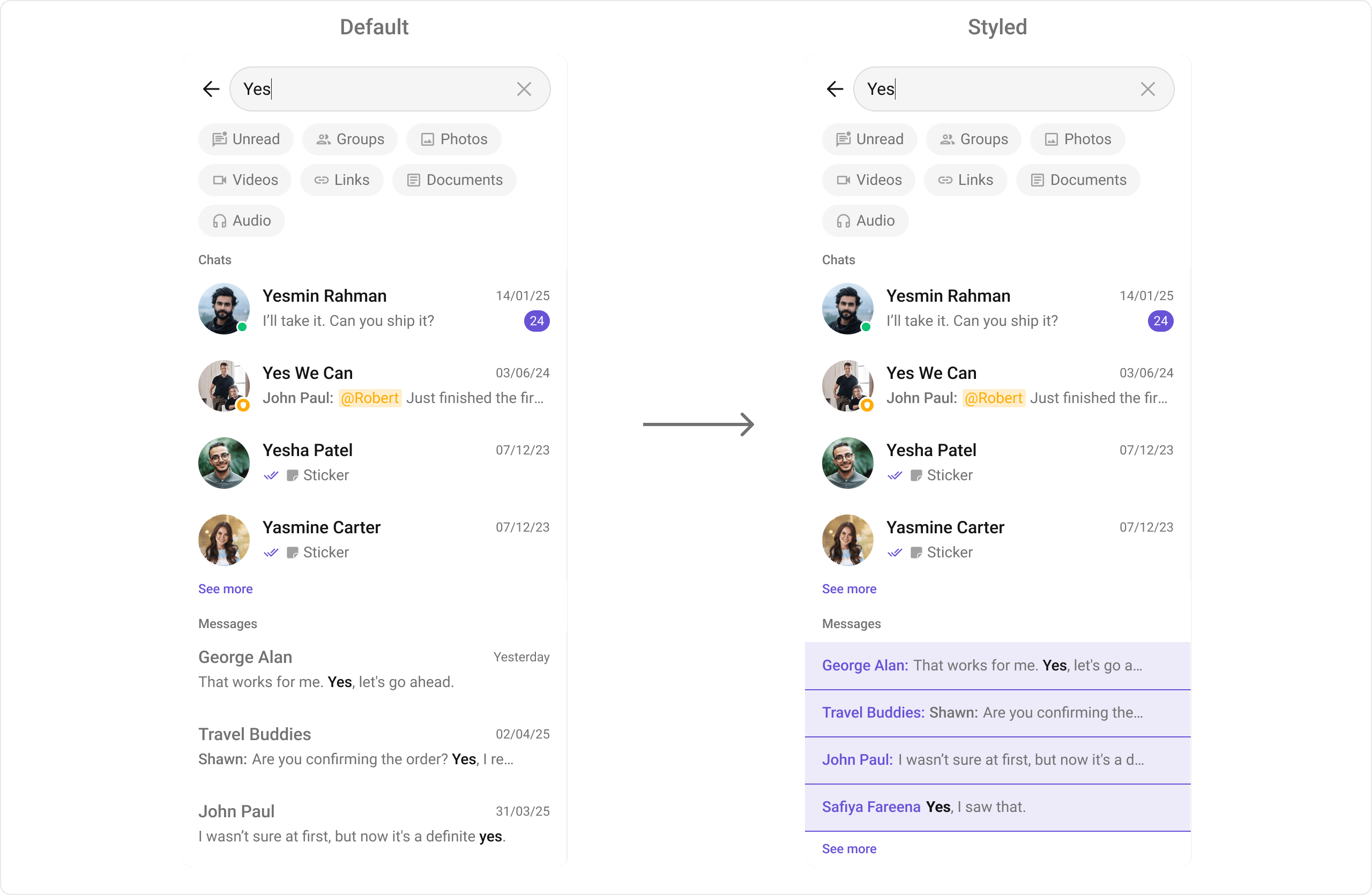
> **What this does:** Defines a custom search style that sets a light purple background color (`#EDEAFA`) for the search component, conversation items, and message items, and applies a Times New Roman font to all text elements including filter chips, section headers, conversation titles/subtitles, message titles/subtitles, timestamps, "see more" text, and the search bar.
```kotlin lines theme={null}
binding.cometchatSearch.setStyle(R.style.CustomSearchStyle)
```
```java lines theme={null}
binding.cometchatSearch.setStyle(R.style.CustomSearchStyle);
```
To view all available style attributes, visit the [attributes file](https://github.com/cometchat/cometchat-uikit-android/blob/v5/chatuikit/src/main/res/values/attr_cometchat_search.xml).
### Programmatic Style Properties
In addition to XML theme styles, the component exposes programmatic setters for fine-grained control:
**Search Bar**
| Method | Type | Description |
| - | - | - |
| `setBackgroundColor` | `@ColorInt int` | Background color of the component |
| `setSearchBarBackgroundColor` | `@ColorInt int` | Background color of the search bar |
| `setSearchBarStrokeWidth` | `@Dimension int` | Stroke width of the search bar border |
| `setSearchBarStrokeColor` | `@ColorInt int` | Stroke color of the search bar border |
| `setSearchBarCornerRadius` | `@Dimension int` | Corner radius of the search bar |
| `setSearchBarTextColor` | `@ColorInt int` | Text color of the search bar input |
| `setSearchBarTextAppearance` | `@StyleRes int` | Text appearance of the search bar input |
| `setSearchBarHintTextColor` | `@ColorInt int` | Hint text color of the search bar |
| `setBackIcon` | `Drawable` | Custom back icon drawable |
| `setBackIconTint` | `@ColorInt int` | Tint color for the back icon |
| `setClearIcon` | `Drawable` | Custom clear icon drawable |
| `setClearIconTint` | `@ColorInt int` | Tint color for the clear icon |
| `setSearchIcon` | `Drawable` | Custom search icon drawable |
| `setSearchIconTint` | `@ColorInt int` | Tint color for the search icon |
**Filter Chips**
| Method | Type | Description |
| - | - | - |
| `setFilterChipBackgroundColor` | `@ColorInt int` | Background color of filter chips |
| `setFilterChipSelectedBackgroundColor` | `@ColorInt int` | Background color of selected filter chips |
| `setFilterChipTextColor` | `@ColorInt int` | Text color of filter chips |
| `setFilterChipSelectedTextColor` | `@ColorInt int` | Text color of selected filter chips |
| `setFilterChipTextAppearance` | `@StyleRes int` | Text appearance of filter chips |
| `setFilterChipStrokeColor` | `@ColorInt int` | Stroke color of filter chips |
| `setFilterChipSelectedStrokeColor` | `@ColorInt int` | Stroke color of selected filter chips |
| `setFilterChipStrokeWidth` | `@Dimension int` | Stroke width of filter chips |
| `setFilterChipCornerRadius` | `@Dimension int` | Corner radius of filter chips |
**Section Headers**
| Method | Type | Description |
| - | - | - |
| `setSectionHeaderTextColor` | `@ColorInt int` | Text color for section headers |
| `setSectionHeaderTextAppearance` | `@StyleRes int` | Text appearance for section headers |
| `setSectionHeaderBackgroundColor` | `@ColorInt int` | Background color for section headers |
**Conversation Items**
| Method | Type | Description |
| - | - | - |
| `setConversationItemBackgroundColor` | `@ColorInt int` | Background color for conversation items |
| `setConversationTitleTextColor` | `@ColorInt int` | Text color for conversation titles |
| `setConversationTitleTextAppearance` | `@StyleRes int` | Text appearance for conversation titles |
| `setConversationSubtitleTextColor` | `@ColorInt int` | Text color for conversation subtitles |
| `setConversationSubtitleTextAppearance` | `@StyleRes int` | Text appearance for conversation subtitles |
| `setConversationTimestampTextColor` | `@ColorInt int` | Text color for conversation timestamps |
| `setConversationTimestampTextAppearance` | `@StyleRes int` | Text appearance for conversation timestamps |
**Message Items**
| Method | Type | Description |
| - | - | - |
| `setMessageItemBackgroundColor` | `@ColorInt int` | Background color for message items |
| `setMessageTitleTextColor` | `@ColorInt int` | Text color for message titles |
| `setMessageTitleTextAppearance` | `@StyleRes int` | Text appearance for message titles |
| `setMessageSubtitleTextColor` | `@ColorInt int` | Text color for message subtitles |
| `setMessageSubtitleTextAppearance` | `@StyleRes int` | Text appearance for message subtitles |
| `setMessageTimestampTextColor` | `@ColorInt int` | Text color for message timestamps |
| `setMessageTimestampTextAppearance` | `@StyleRes int` | Text appearance for message timestamps |
| `setMessageLinkTextColor` | `@ColorInt int` | Text color for links in messages |
| `setMessageLinkTextAppearance` | `@StyleRes int` | Text appearance for links in messages |
**Other Style Properties**
| Method | Type | Description |
| - | - | - |
| `setAvatarStyle` | `@StyleRes int` | Style for avatars in search results |
| `setBadgeStyle` | `@StyleRes int` | Style for badges in search results |
| `setSeeMoreTextColor` | `@ColorInt int` | Text color for "See more" links |
| `setSeeMoreTextAppearance` | `@StyleRes int` | Text appearance for "See more" links |
| `setDateSeparatorTextColor` | `@ColorInt int` | Text color for date separators |
| `setDateSeparatorBackgroundColor` | `@ColorInt int` | Background color for date separators |
| `setDateSeparatorTextAppearance` | `@StyleRes int` | Text appearance for date separators |
| `setEmptyStateTextColor` | `@ColorInt int` | Title text color for the empty state |
| `setEmptyStateTextAppearance` | `@StyleRes int` | Title text appearance for the empty state |
| `setEmptyStateSubtitleTextColor` | `@ColorInt int` | Subtitle text color for the empty state |
| `setEmptyStateSubtitleTextAppearance` | `@StyleRes int` | Subtitle text appearance for the empty state |
| `setEmptyStateIcon` | `Drawable` | Icon for the empty state |
| `setEmptyStateIconTint` | `@ColorInt int` | Tint for the empty state icon |
| `setErrorStateTextColor` | `@ColorInt int` | Title text color for the error state |
| `setErrorStateTextAppearance` | `@StyleRes int` | Title text appearance for the error state |
| `setErrorStateSubtitleTextColor` | `@ColorInt int` | Subtitle text color for the error state |
| `setErrorStateSubtitleTextAppearance` | `@StyleRes int` | Subtitle text appearance for the error state |
| `setErrorStateIcon` | `Drawable` | Icon for the error state |
| `setErrorStateIconTint` | `@ColorInt int` | Tint for the error state icon |
## Customization Matrix
| What to change | Where | Property/API | Example |
| - | - | - | - |
| Override behavior on conversation tap | Activity/Fragment | `setOnConversationClicked` | `setOnConversationClicked { v, pos, conv -> ... }` |
| Override behavior on message tap | Activity/Fragment | `setOnMessageClicked` | `setOnMessageClicked { v, pos, msg -> ... }` |
| Override back press behavior | Activity/Fragment | `setOnBackPressListener` | `setOnBackPressListener { ... }` |
| Scope search to a user | Activity/Fragment | `setUid(String)` | `.setUid("user123")` |
| Scope search to a group | Activity/Fragment | `setGuid(String)` | `.setGuid("group123")` |
| Hide user online status | Activity/Fragment | `setHideUserStatus(boolean)` | `.setHideUserStatus(true)` |
| Hide group type icon | Activity/Fragment | `setHideGroupType(boolean)` | `.setHideGroupType(true)` |
| Set search filters | Activity/Fragment | `setSearchFilters(List)` | `.setSearchFilters(filters)` |
| Set initial active filter | Activity/Fragment | `setInitialSearchFilter(SearchFilter)` | `.setInitialSearchFilter(UIKitConstants.SearchFilter.MESSAGES)` |
| Set search scope | Activity/Fragment | `setSearchIn(List)` | `.setSearchIn(scopes)` |
| Filter conversation results | Activity/Fragment | `setConversationsRequestBuilder` | See Request Builders code above |
| Filter message results | Activity/Fragment | `setMessagesRequestBuilder` | See Request Builders code above |
| Custom conversation item view | Activity/Fragment | `setConversationItemView(ConversationsSearchViewHolderListener)` | See `setConversationItemView` code above |
| Custom text message item view | Activity/Fragment | `setTextMessageItemView(MessagesSearchViewHolderListener)` | See `setTextMessageItemView` code above |
| Custom image message item view | Activity/Fragment | `setImageMessageItemView(MessagesSearchViewHolderListener)` | See `setTextMessageItemView` pattern |
| Custom video message item view | Activity/Fragment | `setVideoMessageItemView(MessagesSearchViewHolderListener)` | See `setTextMessageItemView` pattern |
| Custom audio message item view | Activity/Fragment | `setAudioMessageItemView(MessagesSearchViewHolderListener)` | See `setTextMessageItemView` pattern |
| Custom document message item view | Activity/Fragment | `setDocumentMessageItemView(MessagesSearchViewHolderListener)` | See `setTextMessageItemView` pattern |
| Custom link message item view | Activity/Fragment | `setLinkMessageItemView(MessagesSearchViewHolderListener)` | See `setTextMessageItemView` pattern |
| Custom initial view | Activity/Fragment | `setInitialView(@LayoutRes int)` | `.setInitialView(R.layout.your_initial_view)` |
| Custom loading view | Activity/Fragment | `setLoadingView(View)` | `.setLoadingView(loadingView)` |
| Custom empty view | Activity/Fragment | `setEmptyView(@LayoutRes int)` | `.setEmptyView(R.layout.your_empty_view)` |
| Custom error view | Activity/Fragment | `setErrorView(View)` | `.setErrorView(errorView)` |
| Empty state visibility | Activity/Fragment | `setEmptyStateVisibility(int)` | `.setEmptyStateVisibility(View.GONE)` |
| Error state visibility | Activity/Fragment | `setErrorStateVisibility(int)` | `.setErrorStateVisibility(View.GONE)` |
| Change colors, fonts, spacing | `themes.xml` | `CometChatSearchStyle` | `
```xml themes.xml lines theme={null}
```
> **What this does:** Defines a custom search style that sets a light purple background color (`#EDEAFA`) for the search component, conversation items, and message items, and applies a Times New Roman font to all text elements including filter chips, section headers, conversation titles/subtitles, message titles/subtitles, timestamps, "see more" text, and the search bar.
```kotlin lines theme={null}
binding.cometchatSearch.setStyle(R.style.CustomSearchStyle)
```
```java lines theme={null}
binding.cometchatSearch.setStyle(R.style.CustomSearchStyle);
```
To view all available style attributes, visit the [attributes file](https://github.com/cometchat/cometchat-uikit-android/blob/v5/chatuikit/src/main/res/values/attr_cometchat_search.xml).
### Programmatic Style Properties
In addition to XML theme styles, the component exposes programmatic setters for fine-grained control:
**Search Bar**
| Method | Type | Description |
| - | - | - |
| `setBackgroundColor` | `@ColorInt int` | Background color of the component |
| `setSearchBarBackgroundColor` | `@ColorInt int` | Background color of the search bar |
| `setSearchBarStrokeWidth` | `@Dimension int` | Stroke width of the search bar border |
| `setSearchBarStrokeColor` | `@ColorInt int` | Stroke color of the search bar border |
| `setSearchBarCornerRadius` | `@Dimension int` | Corner radius of the search bar |
| `setSearchBarTextColor` | `@ColorInt int` | Text color of the search bar input |
| `setSearchBarTextAppearance` | `@StyleRes int` | Text appearance of the search bar input |
| `setSearchBarHintTextColor` | `@ColorInt int` | Hint text color of the search bar |
| `setBackIcon` | `Drawable` | Custom back icon drawable |
| `setBackIconTint` | `@ColorInt int` | Tint color for the back icon |
| `setClearIcon` | `Drawable` | Custom clear icon drawable |
| `setClearIconTint` | `@ColorInt int` | Tint color for the clear icon |
| `setSearchIcon` | `Drawable` | Custom search icon drawable |
| `setSearchIconTint` | `@ColorInt int` | Tint color for the search icon |
**Filter Chips**
| Method | Type | Description |
| - | - | - |
| `setFilterChipBackgroundColor` | `@ColorInt int` | Background color of filter chips |
| `setFilterChipSelectedBackgroundColor` | `@ColorInt int` | Background color of selected filter chips |
| `setFilterChipTextColor` | `@ColorInt int` | Text color of filter chips |
| `setFilterChipSelectedTextColor` | `@ColorInt int` | Text color of selected filter chips |
| `setFilterChipTextAppearance` | `@StyleRes int` | Text appearance of filter chips |
| `setFilterChipStrokeColor` | `@ColorInt int` | Stroke color of filter chips |
| `setFilterChipSelectedStrokeColor` | `@ColorInt int` | Stroke color of selected filter chips |
| `setFilterChipStrokeWidth` | `@Dimension int` | Stroke width of filter chips |
| `setFilterChipCornerRadius` | `@Dimension int` | Corner radius of filter chips |
**Section Headers**
| Method | Type | Description |
| - | - | - |
| `setSectionHeaderTextColor` | `@ColorInt int` | Text color for section headers |
| `setSectionHeaderTextAppearance` | `@StyleRes int` | Text appearance for section headers |
| `setSectionHeaderBackgroundColor` | `@ColorInt int` | Background color for section headers |
**Conversation Items**
| Method | Type | Description |
| - | - | - |
| `setConversationItemBackgroundColor` | `@ColorInt int` | Background color for conversation items |
| `setConversationTitleTextColor` | `@ColorInt int` | Text color for conversation titles |
| `setConversationTitleTextAppearance` | `@StyleRes int` | Text appearance for conversation titles |
| `setConversationSubtitleTextColor` | `@ColorInt int` | Text color for conversation subtitles |
| `setConversationSubtitleTextAppearance` | `@StyleRes int` | Text appearance for conversation subtitles |
| `setConversationTimestampTextColor` | `@ColorInt int` | Text color for conversation timestamps |
| `setConversationTimestampTextAppearance` | `@StyleRes int` | Text appearance for conversation timestamps |
**Message Items**
| Method | Type | Description |
| - | - | - |
| `setMessageItemBackgroundColor` | `@ColorInt int` | Background color for message items |
| `setMessageTitleTextColor` | `@ColorInt int` | Text color for message titles |
| `setMessageTitleTextAppearance` | `@StyleRes int` | Text appearance for message titles |
| `setMessageSubtitleTextColor` | `@ColorInt int` | Text color for message subtitles |
| `setMessageSubtitleTextAppearance` | `@StyleRes int` | Text appearance for message subtitles |
| `setMessageTimestampTextColor` | `@ColorInt int` | Text color for message timestamps |
| `setMessageTimestampTextAppearance` | `@StyleRes int` | Text appearance for message timestamps |
| `setMessageLinkTextColor` | `@ColorInt int` | Text color for links in messages |
| `setMessageLinkTextAppearance` | `@StyleRes int` | Text appearance for links in messages |
**Other Style Properties**
| Method | Type | Description |
| - | - | - |
| `setAvatarStyle` | `@StyleRes int` | Style for avatars in search results |
| `setBadgeStyle` | `@StyleRes int` | Style for badges in search results |
| `setSeeMoreTextColor` | `@ColorInt int` | Text color for "See more" links |
| `setSeeMoreTextAppearance` | `@StyleRes int` | Text appearance for "See more" links |
| `setDateSeparatorTextColor` | `@ColorInt int` | Text color for date separators |
| `setDateSeparatorBackgroundColor` | `@ColorInt int` | Background color for date separators |
| `setDateSeparatorTextAppearance` | `@StyleRes int` | Text appearance for date separators |
| `setEmptyStateTextColor` | `@ColorInt int` | Title text color for the empty state |
| `setEmptyStateTextAppearance` | `@StyleRes int` | Title text appearance for the empty state |
| `setEmptyStateSubtitleTextColor` | `@ColorInt int` | Subtitle text color for the empty state |
| `setEmptyStateSubtitleTextAppearance` | `@StyleRes int` | Subtitle text appearance for the empty state |
| `setEmptyStateIcon` | `Drawable` | Icon for the empty state |
| `setEmptyStateIconTint` | `@ColorInt int` | Tint for the empty state icon |
| `setErrorStateTextColor` | `@ColorInt int` | Title text color for the error state |
| `setErrorStateTextAppearance` | `@StyleRes int` | Title text appearance for the error state |
| `setErrorStateSubtitleTextColor` | `@ColorInt int` | Subtitle text color for the error state |
| `setErrorStateSubtitleTextAppearance` | `@StyleRes int` | Subtitle text appearance for the error state |
| `setErrorStateIcon` | `Drawable` | Icon for the error state |
| `setErrorStateIconTint` | `@ColorInt int` | Tint for the error state icon |
## Customization Matrix
| What to change | Where | Property/API | Example |
| - | - | - | - |
| Override behavior on conversation tap | Activity/Fragment | `setOnConversationClicked` | `setOnConversationClicked { v, pos, conv -> ... }` |
| Override behavior on message tap | Activity/Fragment | `setOnMessageClicked` | `setOnMessageClicked { v, pos, msg -> ... }` |
| Override back press behavior | Activity/Fragment | `setOnBackPressListener` | `setOnBackPressListener { ... }` |
| Scope search to a user | Activity/Fragment | `setUid(String)` | `.setUid("user123")` |
| Scope search to a group | Activity/Fragment | `setGuid(String)` | `.setGuid("group123")` |
| Hide user online status | Activity/Fragment | `setHideUserStatus(boolean)` | `.setHideUserStatus(true)` |
| Hide group type icon | Activity/Fragment | `setHideGroupType(boolean)` | `.setHideGroupType(true)` |
| Set search filters | Activity/Fragment | `setSearchFilters(List)` | `.setSearchFilters(filters)` |
| Set initial active filter | Activity/Fragment | `setInitialSearchFilter(SearchFilter)` | `.setInitialSearchFilter(UIKitConstants.SearchFilter.MESSAGES)` |
| Set search scope | Activity/Fragment | `setSearchIn(List)` | `.setSearchIn(scopes)` |
| Filter conversation results | Activity/Fragment | `setConversationsRequestBuilder` | See Request Builders code above |
| Filter message results | Activity/Fragment | `setMessagesRequestBuilder` | See Request Builders code above |
| Custom conversation item view | Activity/Fragment | `setConversationItemView(ConversationsSearchViewHolderListener)` | See `setConversationItemView` code above |
| Custom text message item view | Activity/Fragment | `setTextMessageItemView(MessagesSearchViewHolderListener)` | See `setTextMessageItemView` code above |
| Custom image message item view | Activity/Fragment | `setImageMessageItemView(MessagesSearchViewHolderListener)` | See `setTextMessageItemView` pattern |
| Custom video message item view | Activity/Fragment | `setVideoMessageItemView(MessagesSearchViewHolderListener)` | See `setTextMessageItemView` pattern |
| Custom audio message item view | Activity/Fragment | `setAudioMessageItemView(MessagesSearchViewHolderListener)` | See `setTextMessageItemView` pattern |
| Custom document message item view | Activity/Fragment | `setDocumentMessageItemView(MessagesSearchViewHolderListener)` | See `setTextMessageItemView` pattern |
| Custom link message item view | Activity/Fragment | `setLinkMessageItemView(MessagesSearchViewHolderListener)` | See `setTextMessageItemView` pattern |
| Custom initial view | Activity/Fragment | `setInitialView(@LayoutRes int)` | `.setInitialView(R.layout.your_initial_view)` |
| Custom loading view | Activity/Fragment | `setLoadingView(View)` | `.setLoadingView(loadingView)` |
| Custom empty view | Activity/Fragment | `setEmptyView(@LayoutRes int)` | `.setEmptyView(R.layout.your_empty_view)` |
| Custom error view | Activity/Fragment | `setErrorView(View)` | `.setErrorView(errorView)` |
| Empty state visibility | Activity/Fragment | `setEmptyStateVisibility(int)` | `.setEmptyStateVisibility(View.GONE)` |
| Error state visibility | Activity/Fragment | `setErrorStateVisibility(int)` | `.setErrorStateVisibility(View.GONE)` |
| Change colors, fonts, spacing | `themes.xml` | `CometChatSearchStyle` | `- #EDEAFA
` |
| Apply a custom style | Activity/Fragment | `setStyle(int styleRes)` | `binding.cometchatSearch.setStyle(R.style.CustomSearchStyle)` |
| Search bar background | Activity/Fragment | `setSearchBarBackgroundColor` | `.setSearchBarBackgroundColor(color)` |
| Filter chip colors | Activity/Fragment | `setFilterChip*` methods | `.setFilterChipBackgroundColor(color)` |
| Section header style | Activity/Fragment | `setSectionHeader*` methods | `.setSectionHeaderTextColor(color)` |
| Conversation item style | Activity/Fragment | `setConversation*` methods | `.setConversationTitleTextColor(color)` |
| Message item style | Activity/Fragment | `setMessage*` methods | `.setMessageTitleTextColor(color)` |
| Date/time formatting | Activity/Fragment | `setDateTimeFormatter(DateTimeFormatterCallback)` | See `setDateTimeFormatter` code above |
| Text formatters | Activity/Fragment | `setTextFormatters(List)` | See Text Formatters section |
| Search bar hint text | Activity/Fragment | `setHintText(String)` | `.setHintText("Search...")` |
| Mention-all label | Activity/Fragment | `setMentionAllLabelId(String, String)` | `.setMentionAllLabelId(id, label)` |
| Callback on messages loaded | Activity/Fragment | `setOnLoadMessages(OnLoad)` | `.setOnLoadMessages { list -> ... }` |
| Callback on conversations loaded | Activity/Fragment | `setOnLoadConversations(OnLoad)` | `.setOnLoadConversations { list -> ... }` |
## Next Steps
Browse recent conversations
Browse and search available users
Browse and search available groups
Display messages in a conversation
This documentation is built and hosted on [Mintlify](https://mintlify.com), a developer documentation platform.