> ## Documentation Index
> Fetch the complete documentation index at: https://cometchat-22654f5b-docs-llms-scoped-indexes.mintlify.site/llms.txt
> Use this file to discover all available pages before exploring further.
# Outgoing Call
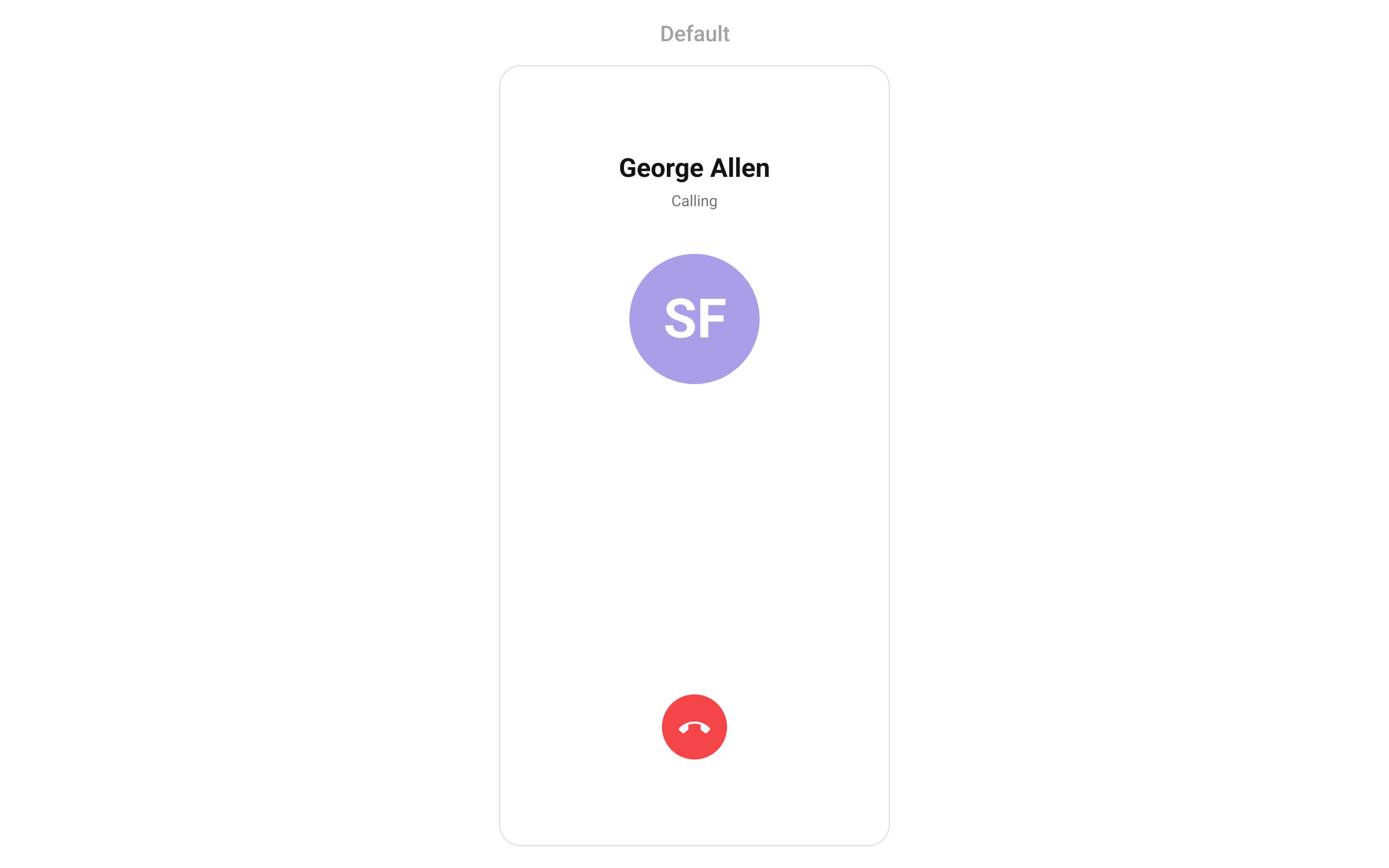
> Full-screen view displaying recipient information and call status during an outgoing call, with automatic transition to the ongoing call screen.
| Field | Value |
| - | - |
| Component | `CometChatOutgoingCall` |
| Package | `cometchat_chat_uikit` |
| Import | `import 'package:cometchat_chat_uikit/cometchat_calls_uikit.dart';` |
| Barrel | **Calls barrel only** — this widget does not resolve from `cometchat_chat_uikit.dart`. A screen showing chat *and* calling imports both. |
| Purpose | Full-screen view displaying recipient information and call status during an outgoing call, with automatic transition to the ongoing call screen. |
| Data props | `call` · `user` |
| Actions | `onError` · `onCancelled` — [details](#actions-and-events) |
| View slots | `subtitleView` · `sessionSettingsBuilder` · `avatarView` · `titleView` · `cancelledView` — [details](#custom-view-slots) |
| Styling | `outgoingCallStyle` — the app `ThemeData` does not reach inside a kit widget, so scope colours here. |
| Prerequisites | `CometChatUIKit` initialised and a user logged in. |
| Full props | [17 props](#functionality) |
`CometChatOutgoingCall` manages the outgoing call process. It displays recipient information (avatar, name) and call status, and automatically transitions to the ongoing call screen when the receiver accepts.
 ***
## Where It Fits
`CometChatOutgoingCall` is typically launched automatically by `CometChatCallButtons` when a call is initiated. It can also be launched manually for custom call flows.
***
## Quick Start
### Automatic (via CallButtons)
When using `CometChatCallButtons`, the outgoing call screen is launched automatically when the user taps a call button. No manual integration needed.
### Manual Launch
For custom call flows:
```dart theme={null}
Navigator.push(context, MaterialPageRoute(
builder: (context) => CometChatOutgoingCall(
user: user,
call: callObject,
),
));
```
```dart theme={null}
import 'package:cometchat_chat_uikit/cometchat_calls_uikit.dart';
import 'package:flutter/material.dart';
class OutgoingCallExample extends StatefulWidget {
const OutgoingCallExample({super.key});
@override
State createState() => _OutgoingCallExampleState();
}
class _OutgoingCallExampleState extends State {
@override
Widget build(BuildContext context) {
return Scaffold(
body: SafeArea(
child: CometChatOutgoingCall(
user: user,
call: callObject,
),
),
);
}
}
```
Prerequisites: CometChat SDK initialized, `enableCalls = true` set in UIKitSettings. See [Call Features](/ui-kit/flutter/call-features) for setup.
***
## Actions and Events
### Callback Methods
#### `onCancelled`
Fires when the user cancels the outgoing call. Override to customize cancel behavior.
```dart theme={null}
CometChatOutgoingCall(
user: user,
call: callObject,
onCancelled: (BuildContext context, Call call) {
// Custom cancel logic
},
)
```
#### `onError`
Fires on internal errors.
```dart theme={null}
CometChatOutgoingCall(
user: user,
call: callObject,
onError: (e) {
debugPrint("Error: $e");
},
)
```
### Global Events
The component emits events via `CometChatCallEvents`:
| Event | Description |
| - | - |
| `ccCallAccepted` | Triggers when the outgoing call is accepted |
| `ccCallRejected` | Triggers when the outgoing call is rejected |
```dart theme={null}
class _YourScreenState extends State with CometChatCallEventListener {
@override
void initState() {
super.initState();
CometChatCallEvents.addCallEventsListener("unique_listener_ID", this);
}
@override
void dispose() {
super.dispose();
CometChatCallEvents.removeCallEventsListener("unique_listener_ID");
}
@override
void ccCallAccepted(Call call) {
debugPrint("Call accepted: ${call.sessionId}");
}
@override
void ccCallRejected(Call call) {
debugPrint("Call rejected: ${call.sessionId}");
}
@override
Widget build(BuildContext context) {
return const Placeholder();
}
}
```
***
## Functionality
| Property | Type | Default | Description |
| - | - | - | - |
| `call` | `Call` | required | Call object with session details |
| `user` | `User?` | `null` | Recipient user object |
| `onError` | `OnError?` | `null` | Error callback |
| `onCancelled` | `Function(BuildContext context, Call call)?` | `null` | Callback when call is cancelled |
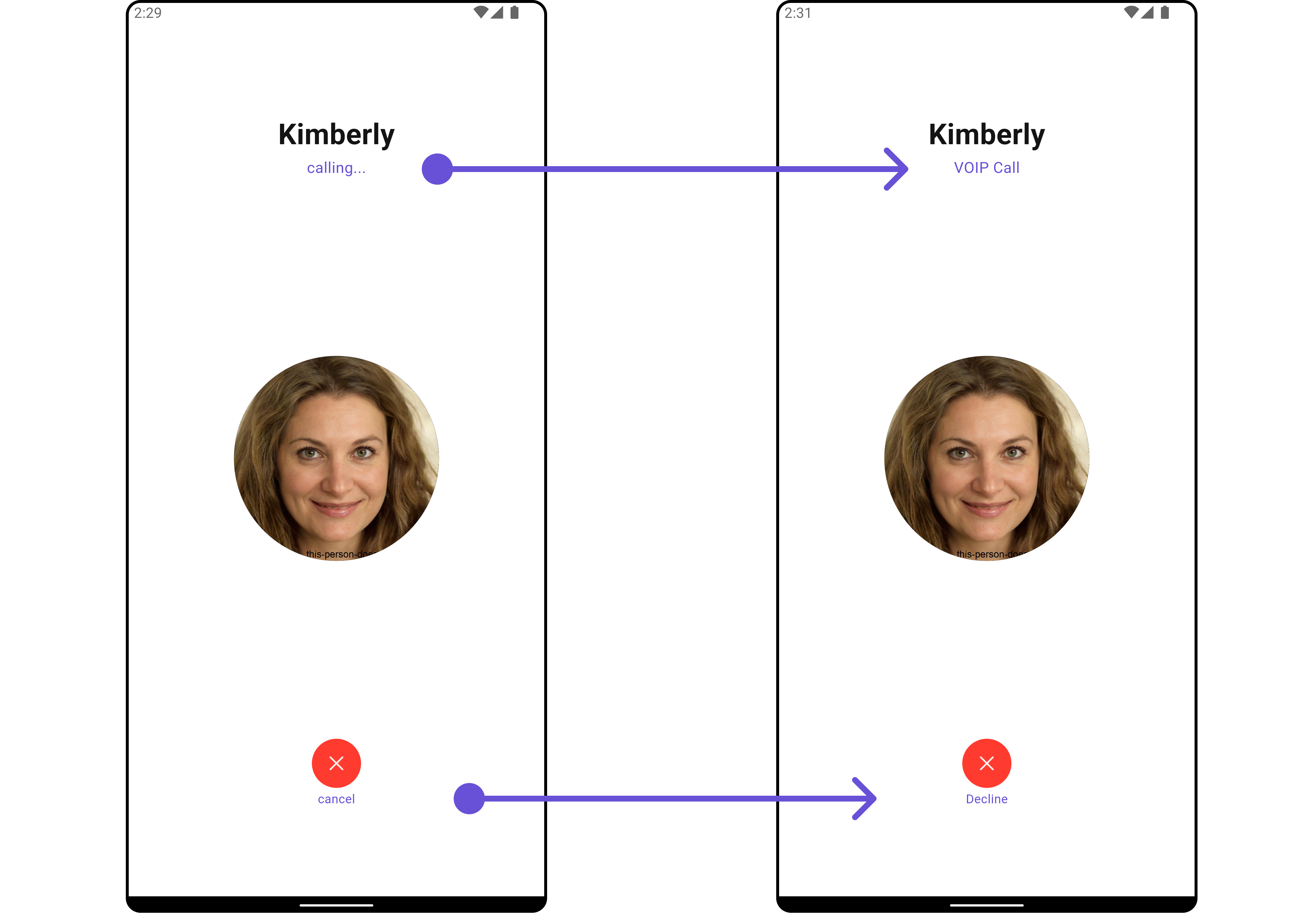
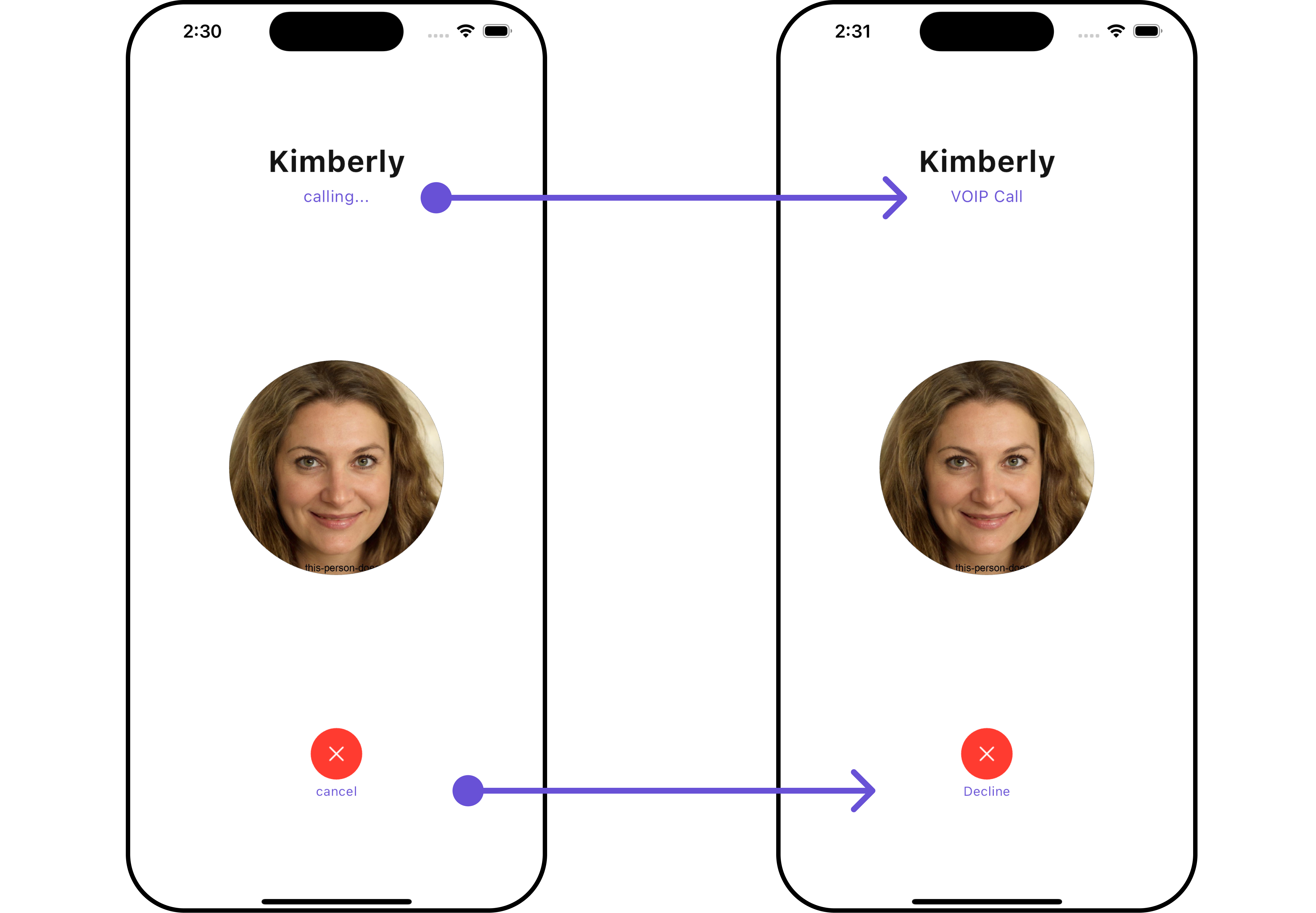
| `subtitleView` | `Widget? Function(BuildContext context, Call call)?` | `null` | Subtitle view builder |
| `disableSoundForCalls` | `bool?` | `null` | Disable outgoing call sound |
| `customSoundForCalls` | `String?` | `null` | Custom sound asset path |
| `customSoundForCallsPackage` | `String?` | `null` | Package name for custom sound asset |
| `declineButtonIcon` | `Widget?` | `null` | Custom decline/cancel button icon |
| `outgoingCallStyle` | `CometChatOutgoingCallStyle?` | `null` | Custom outgoing call style |
| `sessionSettingsBuilder` | `SessionSettingsBuilder?` | `null` | Custom session settings builder (V5) |
| `width` | `double?` | `null` | Widget width |
| `height` | `double?` | `null` | Widget height |
| `avatarView` | `Widget? Function(BuildContext context, Call call)?` | `null` | Avatar view builder |
| `titleView` | `Widget? Function(BuildContext context, Call call)?` | `null` | Title view builder |
| `cancelledView` | `Widget? Function(BuildContext context, Call call)?` | `null` | Cancelled view builder (bottom action button) |
| `bloc` | `OutgoingCallBloc?` | `null` | Optional external BLoC for testing/injection |
**Example — custom decline icon and disabled sound:**
```dart theme={null}
CometChatOutgoingCall(
user: user,
call: callObject,
disableSoundForCalls: true,
declineButtonIcon: const Icon(Icons.call_end, color: Colors.white),
)
```
***
## Where It Fits
`CometChatOutgoingCall` is typically launched automatically by `CometChatCallButtons` when a call is initiated. It can also be launched manually for custom call flows.
***
## Quick Start
### Automatic (via CallButtons)
When using `CometChatCallButtons`, the outgoing call screen is launched automatically when the user taps a call button. No manual integration needed.
### Manual Launch
For custom call flows:
```dart theme={null}
Navigator.push(context, MaterialPageRoute(
builder: (context) => CometChatOutgoingCall(
user: user,
call: callObject,
),
));
```
```dart theme={null}
import 'package:cometchat_chat_uikit/cometchat_calls_uikit.dart';
import 'package:flutter/material.dart';
class OutgoingCallExample extends StatefulWidget {
const OutgoingCallExample({super.key});
@override
State createState() => _OutgoingCallExampleState();
}
class _OutgoingCallExampleState extends State {
@override
Widget build(BuildContext context) {
return Scaffold(
body: SafeArea(
child: CometChatOutgoingCall(
user: user,
call: callObject,
),
),
);
}
}
```
Prerequisites: CometChat SDK initialized, `enableCalls = true` set in UIKitSettings. See [Call Features](/ui-kit/flutter/call-features) for setup.
***
## Actions and Events
### Callback Methods
#### `onCancelled`
Fires when the user cancels the outgoing call. Override to customize cancel behavior.
```dart theme={null}
CometChatOutgoingCall(
user: user,
call: callObject,
onCancelled: (BuildContext context, Call call) {
// Custom cancel logic
},
)
```
#### `onError`
Fires on internal errors.
```dart theme={null}
CometChatOutgoingCall(
user: user,
call: callObject,
onError: (e) {
debugPrint("Error: $e");
},
)
```
### Global Events
The component emits events via `CometChatCallEvents`:
| Event | Description |
| - | - |
| `ccCallAccepted` | Triggers when the outgoing call is accepted |
| `ccCallRejected` | Triggers when the outgoing call is rejected |
```dart theme={null}
class _YourScreenState extends State with CometChatCallEventListener {
@override
void initState() {
super.initState();
CometChatCallEvents.addCallEventsListener("unique_listener_ID", this);
}
@override
void dispose() {
super.dispose();
CometChatCallEvents.removeCallEventsListener("unique_listener_ID");
}
@override
void ccCallAccepted(Call call) {
debugPrint("Call accepted: ${call.sessionId}");
}
@override
void ccCallRejected(Call call) {
debugPrint("Call rejected: ${call.sessionId}");
}
@override
Widget build(BuildContext context) {
return const Placeholder();
}
}
```
***
## Functionality
| Property | Type | Default | Description |
| - | - | - | - |
| `call` | `Call` | required | Call object with session details |
| `user` | `User?` | `null` | Recipient user object |
| `onError` | `OnError?` | `null` | Error callback |
| `onCancelled` | `Function(BuildContext context, Call call)?` | `null` | Callback when call is cancelled |
| `subtitleView` | `Widget? Function(BuildContext context, Call call)?` | `null` | Subtitle view builder |
| `disableSoundForCalls` | `bool?` | `null` | Disable outgoing call sound |
| `customSoundForCalls` | `String?` | `null` | Custom sound asset path |
| `customSoundForCallsPackage` | `String?` | `null` | Package name for custom sound asset |
| `declineButtonIcon` | `Widget?` | `null` | Custom decline/cancel button icon |
| `outgoingCallStyle` | `CometChatOutgoingCallStyle?` | `null` | Custom outgoing call style |
| `sessionSettingsBuilder` | `SessionSettingsBuilder?` | `null` | Custom session settings builder (V5) |
| `width` | `double?` | `null` | Widget width |
| `height` | `double?` | `null` | Widget height |
| `avatarView` | `Widget? Function(BuildContext context, Call call)?` | `null` | Avatar view builder |
| `titleView` | `Widget? Function(BuildContext context, Call call)?` | `null` | Title view builder |
| `cancelledView` | `Widget? Function(BuildContext context, Call call)?` | `null` | Cancelled view builder (bottom action button) |
| `bloc` | `OutgoingCallBloc?` | `null` | Optional external BLoC for testing/injection |
**Example — custom decline icon and disabled sound:**
```dart theme={null}
CometChatOutgoingCall(
user: user,
call: callObject,
disableSoundForCalls: true,
declineButtonIcon: const Icon(Icons.call_end, color: Colors.white),
)
```
 ***
## Custom View Slots
### Avatar View
Replace the recipient's avatar.
```dart theme={null}
CometChatOutgoingCall(
user: user,
call: callObject,
avatarView: (context, call) {
return CircleAvatar(
radius: 50,
backgroundImage: NetworkImage(user?.avatar ?? ""),
);
},
)
```
### Title View
Replace the recipient's name / call status text.
```dart theme={null}
CometChatOutgoingCall(
user: user,
call: callObject,
titleView: (context, call) {
return Text(
call.receiver is User
? (call.receiver as User).name
: (call.receiver is Group ? (call.receiver as Group).name : "Unknown"),
style: TextStyle(fontSize: 22, fontWeight: FontWeight.bold, color: Colors.white),
);
},
)
```
### Subtitle View
Replace the subtitle (e.g., "Calling...").
```dart theme={null}
CometChatOutgoingCall(
user: user,
call: callObject,
subtitleView: (context, call) {
return Text(
"Ringing...",
style: TextStyle(fontSize: 14, color: Colors.white70),
);
},
)
```
### Cancelled View
Replace the cancel/end call button.
```dart theme={null}
CometChatOutgoingCall(
user: user,
call: callObject,
cancelledView: (context, call) {
return ElevatedButton.icon(
onPressed: () {
// Cancel call
},
icon: Icon(Icons.call_end),
label: Text("End Call"),
style: ElevatedButton.styleFrom(backgroundColor: Colors.red),
);
},
)
```
***
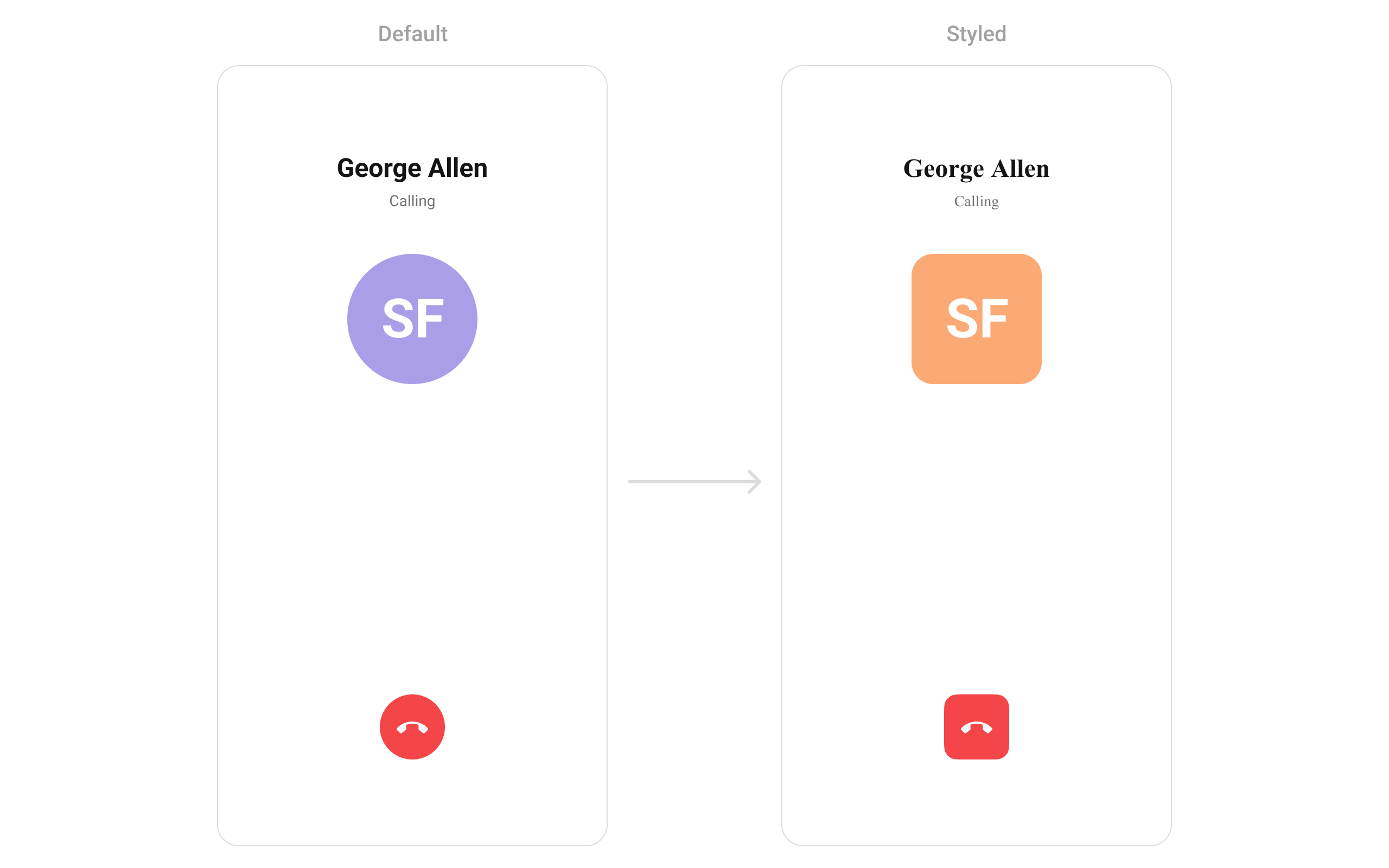
## Style
```dart theme={null}
CometChatOutgoingCall(
user: user,
call: callObject,
outgoingCallStyle: CometChatOutgoingCallStyle(
avatarStyle: CometChatAvatarStyle(
backgroundColor: Color(0xFFFBAA75),
borderRadius: BorderRadius.circular(8),
),
declineButtonColor: Color(0xFFF44649),
declineButtonBorderRadius: BorderRadius.circular(12),
),
)
```
***
## Custom View Slots
### Avatar View
Replace the recipient's avatar.
```dart theme={null}
CometChatOutgoingCall(
user: user,
call: callObject,
avatarView: (context, call) {
return CircleAvatar(
radius: 50,
backgroundImage: NetworkImage(user?.avatar ?? ""),
);
},
)
```
### Title View
Replace the recipient's name / call status text.
```dart theme={null}
CometChatOutgoingCall(
user: user,
call: callObject,
titleView: (context, call) {
return Text(
call.receiver is User
? (call.receiver as User).name
: (call.receiver is Group ? (call.receiver as Group).name : "Unknown"),
style: TextStyle(fontSize: 22, fontWeight: FontWeight.bold, color: Colors.white),
);
},
)
```
### Subtitle View
Replace the subtitle (e.g., "Calling...").
```dart theme={null}
CometChatOutgoingCall(
user: user,
call: callObject,
subtitleView: (context, call) {
return Text(
"Ringing...",
style: TextStyle(fontSize: 14, color: Colors.white70),
);
},
)
```
### Cancelled View
Replace the cancel/end call button.
```dart theme={null}
CometChatOutgoingCall(
user: user,
call: callObject,
cancelledView: (context, call) {
return ElevatedButton.icon(
onPressed: () {
// Cancel call
},
icon: Icon(Icons.call_end),
label: Text("End Call"),
style: ElevatedButton.styleFrom(backgroundColor: Colors.red),
);
},
)
```
***
## Style
```dart theme={null}
CometChatOutgoingCall(
user: user,
call: callObject,
outgoingCallStyle: CometChatOutgoingCallStyle(
avatarStyle: CometChatAvatarStyle(
backgroundColor: Color(0xFFFBAA75),
borderRadius: BorderRadius.circular(8),
),
declineButtonColor: Color(0xFFF44649),
declineButtonBorderRadius: BorderRadius.circular(12),
),
)
```
 ### Style Properties
| Property | Description |
| - | - |
| `avatarStyle` | Recipient avatar appearance |
| `declineButtonColor` | Cancel button background color |
| `declineButtonBorderRadius` | Cancel button corner radius |
| `backgroundColor` | Screen background color |
***
## Key V6 Differences
| Aspect | V5 | V6 |
| - | - | - |
| Subtitle | Static `String?` | Dynamic `subtitleView: Widget? Function(BuildContext, Call)?` |
| Decline callback | `onDecline` | Renamed to `onCancelled` |
| Decline icon | URL-based `String?` | Widget-based `declineButtonIcon: Widget?` |
| State management | GetX controller | BLoC (`OutgoingCallBloc`) |
| Removed | `theme`, `avatarStyle`, `cardStyle`, `buttonStyle`, `ongoingCallConfiguration` | Integrated into main style |
***
## Next Steps
Handle incoming calls
Add voice and video call buttons
Complete calling setup
Detailed styling reference
This documentation is built and hosted on [Mintlify](https://mintlify.com), a developer documentation platform.
### Style Properties
| Property | Description |
| - | - |
| `avatarStyle` | Recipient avatar appearance |
| `declineButtonColor` | Cancel button background color |
| `declineButtonBorderRadius` | Cancel button corner radius |
| `backgroundColor` | Screen background color |
***
## Key V6 Differences
| Aspect | V5 | V6 |
| - | - | - |
| Subtitle | Static `String?` | Dynamic `subtitleView: Widget? Function(BuildContext, Call)?` |
| Decline callback | `onDecline` | Renamed to `onCancelled` |
| Decline icon | URL-based `String?` | Widget-based `declineButtonIcon: Widget?` |
| State management | GetX controller | BLoC (`OutgoingCallBloc`) |
| Removed | `theme`, `avatarStyle`, `cardStyle`, `buttonStyle`, `ongoingCallConfiguration` | Integrated into main style |
***
## Next Steps
Handle incoming calls
Add voice and video call buttons
Complete calling setup
Detailed styling reference
This documentation is built and hosted on [Mintlify](https://mintlify.com), a developer documentation platform.