> ## Documentation Index
> Fetch the complete documentation index at: https://cometchat-22654f5b-docs-llms-scoped-indexes.mintlify.site/llms.txt
> Use this file to discover all available pages before exploring further.
# SchedulerBubble
> SchedulerBubble — CometChat documentation.
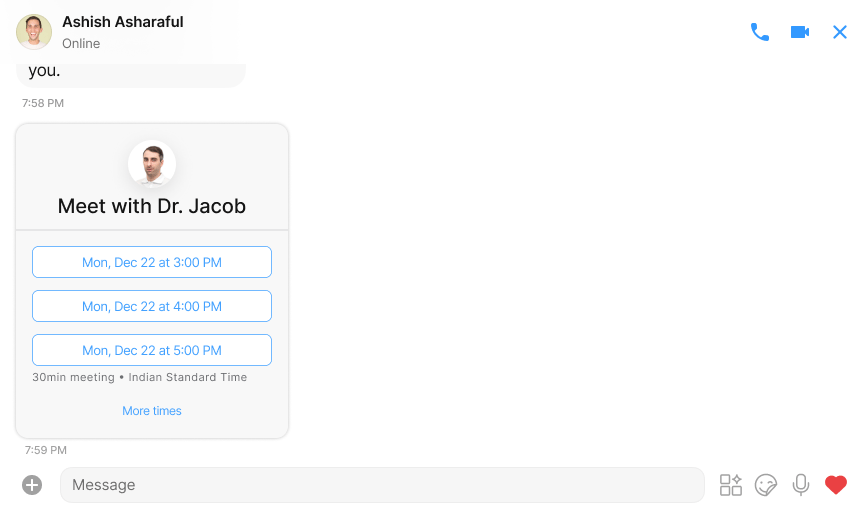
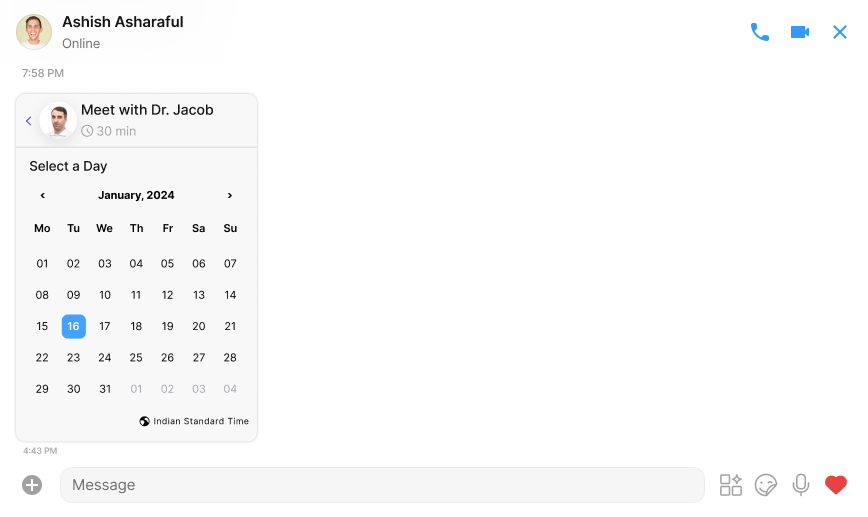
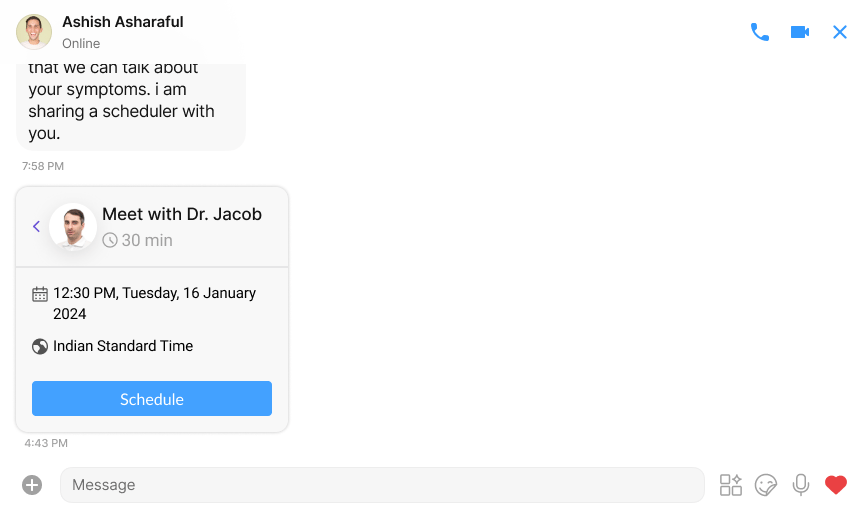
SchedulerBubble is a versatile type of component designed to facilitate easy and efficient event scheduling. It offers the following key features:
1. **Event Scheduling:** Users can send a calendar-like invitation, similar to `Calendly`, allowing the recipient to schedule a meeting conveniently.
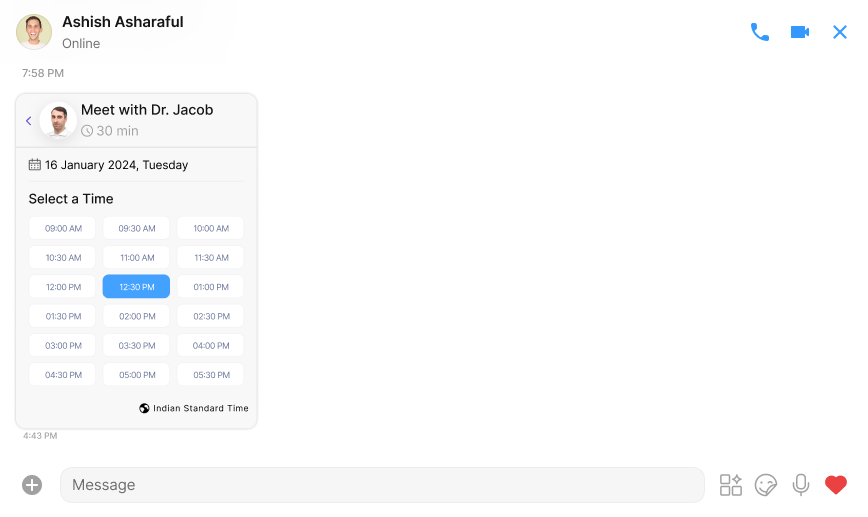
2. **Flexible event Parameters**: Senders have the flexibility to set allowed event times and define the time intervals between consecutive events.
3. **Customisable Availability Hours**: Message senders can personalise their availability by specifying a range of hours during which meetings can be scheduled.
4. **ICS File Integration**: seamlessly integrates with ICS files, analysing the data to provide users with available time slots based on their free time.
5. **Developer Configuration**: As a developer, you have the freedom to configure actions triggered upon scheduling button clicks. This ensures that the platform can be tailored to specific needs and workflows.
`ScheduleBubble` aims to streamline the event scheduling process, offering a user-friendly experience for both senders and recipients. With its robust features, it provides a dynamic solution for coordinating and managing meetings efficiently.
 ## Properties
| Properties | Type | Description |
| - | - | - |
| **title** | String | title of the scheduler bubble |
| **schedulerMessage** | [Scheduler Message](/web-shared/scheduler-message) | An instance of the `SchedulerMessage` class which holds information about the event scheduling availability . |
| **SchedulerBubbleStyle** | `SchedulerBubbleStyle` | An object of styles for customizing the UI of the meeting bubble. You can override styles for the wrapper, title, goal completion text, schedule button, etc. If a style is not provided, the default style will be used. |
| **onScheduleClick** | `(timestamp:string, message: SchedulerMessage )=> void` | A parameter that handles the on click callback. |
| **loggedInUser** | `Object` | An instance for logged in user object |
## SchedulerBubbleStyle
`SchedulerBubbleStyle` is a class extending `BaseStyle` containing attributes to customize the appearance of the `SchedulerBubble` component.
| Properties | Type | Description |
| - | - | - |
| **suggestedTimeTextFont** | string | text font for suggested time |
| **suggestedTimeTextColor** | string | text color for suggested time |
| **suggestedTimeBackground** | string | text background for suggested time |
| **suggestedTimeBorder** | string | text border for suggested time |
| **suggestedTimeBorderRadius** | string | text border radius for suggested time |
| **suggestedTimeDisabledTextFont** | string | disabled text font for suggested time |
| **suggestedTimeDisabledTextColor** | string | disabled text color for suggested time |
| **suggestedTimeDisabledBackground** | string | disabled text background for suggested time |
| **suggestedTimeDisabledBorder** | string | disabled text border for suggested time |
| **suggestedTimeDisabledBorderRadius** | string | disabled text border radius for suggested time |
| **titleTextFont** | string | text font for title |
| **titleTextColor** | string | text color for title |
| **subtitleTextFont** | string | text font for subtitle |
| **subtitleTextColor** | string | text color for subtitle |
| **summaryTextFont** | string | text font for summary |
| **summaryTextColor** | string | text color for summary |
| **goalCompletionTextFont** | string | text font for goal completion |
| **goalCompletionTextColor** | string | text color for goal completion |
| **timezoneTextFont** | string | text font for timezone |
| **timezoneTextColor** | string | text color for timezone |
| **moreButtonTextFont** | string | text font for more button |
| **moreButtonTextColor** | string | text color for more button |
| **moreButtonTextBorder** | string | border for more button |
| **moreButtonTextBorderRadius** | string | border radius for more button |
| **moreButtonTextBackground** | string | background for more button |
| **moreButtonDisabledTextFont** | string | disabled text font for more button |
| **moreButtonDisabledTextColor** | string | disabled text color for more button |
| **moreButtonDisabledTextBorder** | string | disabled border for more button |
| **moreButtonDisabledTextBorderRadius** | string | disabled border radius for more button |
| **moreButtonDisabledTextBackground** | string | disabled background for more button |
| **loadingIconTint** | string | tint for loading icon |
| **backButtonIconTint** | string | tint for back button icon |
| **clockIconTint** | string | tint for clock icon |
| **calendarIconTint** | string | tint for calendar icon |
| **timezoneIconTint** | string | tint for timezone icon |
| **errorTextFont** | string | text font for error message |
| **errorTextColor** | string | text color for error message |
| **seperatorTint** | string | tint for seperator |
| **listItemStyle** | ListItemStyle | style object for CometChatListItem |
| **scheduleButtonStyle** | object | style object for scheduleButton |
| **avatarStyle** | AvatarStyle | style object for CometChatAvatar |
| **quickViewStyle** | QuickViewStyle | style object for CometChatQuickView |
| **dateSelectorStyle** | CalendarStyle | style object for CometChatCalendar |
| **timeSlotSelectorStyle** | TimeSlotStyle | style object for CometChatTimeSlot |
## Usage
SchedulerBubble allows for a dynamic combination of developer-provided data and data collected from the user's interaction. It provides flexibility for developers to customize the behaviour of the scheduler button and integrate it seamlessly into their application.
```html theme={null}
schedulerMessage={message} //message: SchedulerMessage
schedulerBubbleStyle={style} //style?: SchedulerBubbleStyle
```
#### Data submitted by scheduler bubble after user's Interaction:
After user interaction, SchedulerBubble gives the following payload to the specified endpoint
like for above case endpoint is "abc.com"
on click of schedule button it will generate a POST request to given URL with the following payload and headers
```json theme={null}
{
"appID": "XXXX",
"region": "XX",
"trigger": "ui_message_interacted",
"payload": {
"key1": "value1"
},
"data": {
"conversationId": "user1_user_user4",
"sender": "user1",
"receiver": "user4",
"receiverType": "user",
"messageCategory": "interactive",
"messageType": "scheduler",
"messageId": 373,
"interactionTimezoneCode": "Asia/Kolkata",
"interactedBy": "user4",
"interactedElementId": "1",
"schedulerData": {
"meetStartAt": "2024-02-15T01:00",
"duration": 60
}
}
}
```
| Properties | Description |
| - | - |
| meetStartAt | time slot selected by user |
| duration | duration for the meeting |
| `appID` | app id of the application |
| `region` | The text message |
| `payload` | The type of the receiver- `CometChatReceiverType.user` (user) or `CometChatReceiverType.group` (group) |
| conversationId | The type of the message that needs to be sent which in this case can be: `CometChatMessageType.text`\_\_(text) |
| sender | `UID` of the message sender |
| receiver | `UID` of the user or `GUID` of the group receiving the message |
| receiverType | The type of the receiver- `CometChatReceiverType.user` (user) or `CometChatReceiverType.group` (group) |
| messageCategory | The category of the message - MessageCategoryConstants.interactive |
| messageType | The type of message which is MessageTypeConstants.scheduler |
| messageId | The id of the message |
| interactionTimezoneCode | The time zone of user's device |
| interactedBy | The User id of interacting user |
| interactedElementId | The element id of element making the request |
if header is provided in the action meeting bubble will not add anything to the header while generating the request
This documentation is built and hosted on [Mintlify](https://mintlify.com), a developer documentation platform.
## Properties
| Properties | Type | Description |
| - | - | - |
| **title** | String | title of the scheduler bubble |
| **schedulerMessage** | [Scheduler Message](/web-shared/scheduler-message) | An instance of the `SchedulerMessage` class which holds information about the event scheduling availability . |
| **SchedulerBubbleStyle** | `SchedulerBubbleStyle` | An object of styles for customizing the UI of the meeting bubble. You can override styles for the wrapper, title, goal completion text, schedule button, etc. If a style is not provided, the default style will be used. |
| **onScheduleClick** | `(timestamp:string, message: SchedulerMessage )=> void` | A parameter that handles the on click callback. |
| **loggedInUser** | `Object` | An instance for logged in user object |
## SchedulerBubbleStyle
`SchedulerBubbleStyle` is a class extending `BaseStyle` containing attributes to customize the appearance of the `SchedulerBubble` component.
| Properties | Type | Description |
| - | - | - |
| **suggestedTimeTextFont** | string | text font for suggested time |
| **suggestedTimeTextColor** | string | text color for suggested time |
| **suggestedTimeBackground** | string | text background for suggested time |
| **suggestedTimeBorder** | string | text border for suggested time |
| **suggestedTimeBorderRadius** | string | text border radius for suggested time |
| **suggestedTimeDisabledTextFont** | string | disabled text font for suggested time |
| **suggestedTimeDisabledTextColor** | string | disabled text color for suggested time |
| **suggestedTimeDisabledBackground** | string | disabled text background for suggested time |
| **suggestedTimeDisabledBorder** | string | disabled text border for suggested time |
| **suggestedTimeDisabledBorderRadius** | string | disabled text border radius for suggested time |
| **titleTextFont** | string | text font for title |
| **titleTextColor** | string | text color for title |
| **subtitleTextFont** | string | text font for subtitle |
| **subtitleTextColor** | string | text color for subtitle |
| **summaryTextFont** | string | text font for summary |
| **summaryTextColor** | string | text color for summary |
| **goalCompletionTextFont** | string | text font for goal completion |
| **goalCompletionTextColor** | string | text color for goal completion |
| **timezoneTextFont** | string | text font for timezone |
| **timezoneTextColor** | string | text color for timezone |
| **moreButtonTextFont** | string | text font for more button |
| **moreButtonTextColor** | string | text color for more button |
| **moreButtonTextBorder** | string | border for more button |
| **moreButtonTextBorderRadius** | string | border radius for more button |
| **moreButtonTextBackground** | string | background for more button |
| **moreButtonDisabledTextFont** | string | disabled text font for more button |
| **moreButtonDisabledTextColor** | string | disabled text color for more button |
| **moreButtonDisabledTextBorder** | string | disabled border for more button |
| **moreButtonDisabledTextBorderRadius** | string | disabled border radius for more button |
| **moreButtonDisabledTextBackground** | string | disabled background for more button |
| **loadingIconTint** | string | tint for loading icon |
| **backButtonIconTint** | string | tint for back button icon |
| **clockIconTint** | string | tint for clock icon |
| **calendarIconTint** | string | tint for calendar icon |
| **timezoneIconTint** | string | tint for timezone icon |
| **errorTextFont** | string | text font for error message |
| **errorTextColor** | string | text color for error message |
| **seperatorTint** | string | tint for seperator |
| **listItemStyle** | ListItemStyle | style object for CometChatListItem |
| **scheduleButtonStyle** | object | style object for scheduleButton |
| **avatarStyle** | AvatarStyle | style object for CometChatAvatar |
| **quickViewStyle** | QuickViewStyle | style object for CometChatQuickView |
| **dateSelectorStyle** | CalendarStyle | style object for CometChatCalendar |
| **timeSlotSelectorStyle** | TimeSlotStyle | style object for CometChatTimeSlot |
## Usage
SchedulerBubble allows for a dynamic combination of developer-provided data and data collected from the user's interaction. It provides flexibility for developers to customize the behaviour of the scheduler button and integrate it seamlessly into their application.
```html theme={null}
schedulerMessage={message} //message: SchedulerMessage
schedulerBubbleStyle={style} //style?: SchedulerBubbleStyle
```
#### Data submitted by scheduler bubble after user's Interaction:
After user interaction, SchedulerBubble gives the following payload to the specified endpoint
like for above case endpoint is "abc.com"
on click of schedule button it will generate a POST request to given URL with the following payload and headers
```json theme={null}
{
"appID": "XXXX",
"region": "XX",
"trigger": "ui_message_interacted",
"payload": {
"key1": "value1"
},
"data": {
"conversationId": "user1_user_user4",
"sender": "user1",
"receiver": "user4",
"receiverType": "user",
"messageCategory": "interactive",
"messageType": "scheduler",
"messageId": 373,
"interactionTimezoneCode": "Asia/Kolkata",
"interactedBy": "user4",
"interactedElementId": "1",
"schedulerData": {
"meetStartAt": "2024-02-15T01:00",
"duration": 60
}
}
}
```
| Properties | Description |
| - | - |
| meetStartAt | time slot selected by user |
| duration | duration for the meeting |
| `appID` | app id of the application |
| `region` | The text message |
| `payload` | The type of the receiver- `CometChatReceiverType.user` (user) or `CometChatReceiverType.group` (group) |
| conversationId | The type of the message that needs to be sent which in this case can be: `CometChatMessageType.text`\_\_(text) |
| sender | `UID` of the message sender |
| receiver | `UID` of the user or `GUID` of the group receiving the message |
| receiverType | The type of the receiver- `CometChatReceiverType.user` (user) or `CometChatReceiverType.group` (group) |
| messageCategory | The category of the message - MessageCategoryConstants.interactive |
| messageType | The type of message which is MessageTypeConstants.scheduler |
| messageId | The id of the message |
| interactionTimezoneCode | The time zone of user's device |
| interactedBy | The User id of interacting user |
| interactedElementId | The element id of element making the request |
if header is provided in the action meeting bubble will not add anything to the header while generating the request
This documentation is built and hosted on [Mintlify](https://mintlify.com), a developer documentation platform.